The Claudester
Participant
December 20, 2019
Answered

Alpha numerical characters appearing in the Sign As drop field when attempting to digitally sign

  • December 20, 2019
  • 1 reply
  • 842 views

Can anyone explain to me what's happening here? Instead of showing my name, it's displaying these characters in addition to not allowing me ot sign PDF documents.
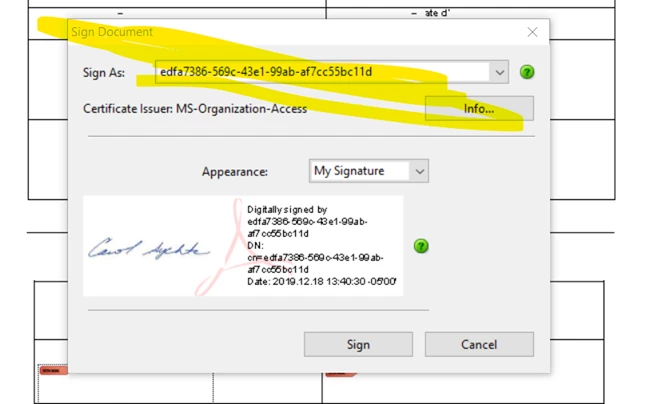
Any help would be greatly appreciated.

I'm using Adobe Acrobat Pro X.

Thank you.

This topic has been closed for replies.
Correct answer ls_rbls
Thanks everyone for looking in to this.

At the end, looking over the user in question's shoulders, I had her recreate her self-sign certificate and all got resolved.

Thank you again and have a Very Merry Christmas and a Happy New Year.

Claude

________________________________

The information in this email is intended only for the named recipient and may be privileged or confidential. If you are not the intended recipient please notify the sender immediately. Do not copy or distribute this email or the information it contains and please delete this email.

Le contenu du présent courriel peut être de nature confidentielle et est destiné uniquement au destinataire désigné. Si vous avez reçu ce courriel par erreur, veuillez le supprimer et en aviser l'expéditeur immédiatement. Toute diffusion ou distribution est interdite. .SCC-CCN_O01.

Great! you were able to sort it out by yourself... don't forget to mark your answer as correct.

1 reply

ls_rbls
Community Expert
Community Expert
December 20, 2019

Hi,


Is this a digital certificate that you created to sign PDF documents or are you using a smart card ?

The Claudester
Participant
December 20, 2019

Yes, it's the self sign certificate Adobe allows you to create yourself within Acrobat.

ls_rbls
Community Expert
Community Expert
December 21, 2019

I am not sure what could've gone wrong here but you can try creating a self-sign certificate using the following reference:


It is possible that a step was skipped when the certificate was created, stored in the wrong certificate store, or adjusting Preferences settings.


Check this step by step quick guide and review what steps you followed before but taking into account the guidance of the first link that I posted above:


See more here about validating digital certificates and using digital IDs: