
Participant
February 7, 2024
Answered

Alt Text disappeared when Password Secuirty added to the PDF File

  • February 7, 2024
  • 2 replies
  • 610 views

HI There, 

Alt Text is disappeared when Password Secuirty added to the PDF File. 


Steps to Reproduce: 

1. Open the PDF 

2. Add Alt Text to the Graphic/image

3. Add password security (Right click --> Doucment Properties --> Security --> Add password secuirty --> pin used 123123123)

4. Save the PDF and Close 

5. Reopen the PDF and right click on the Image tag and look for properties. 

6. Verify Alt Text 

Alt Text is didappread and not apperaed in the Alt Text text box. 


Please review attached PDF and advise ASAP. 


This topic has been closed for replies.
Correct answer JR Boulay

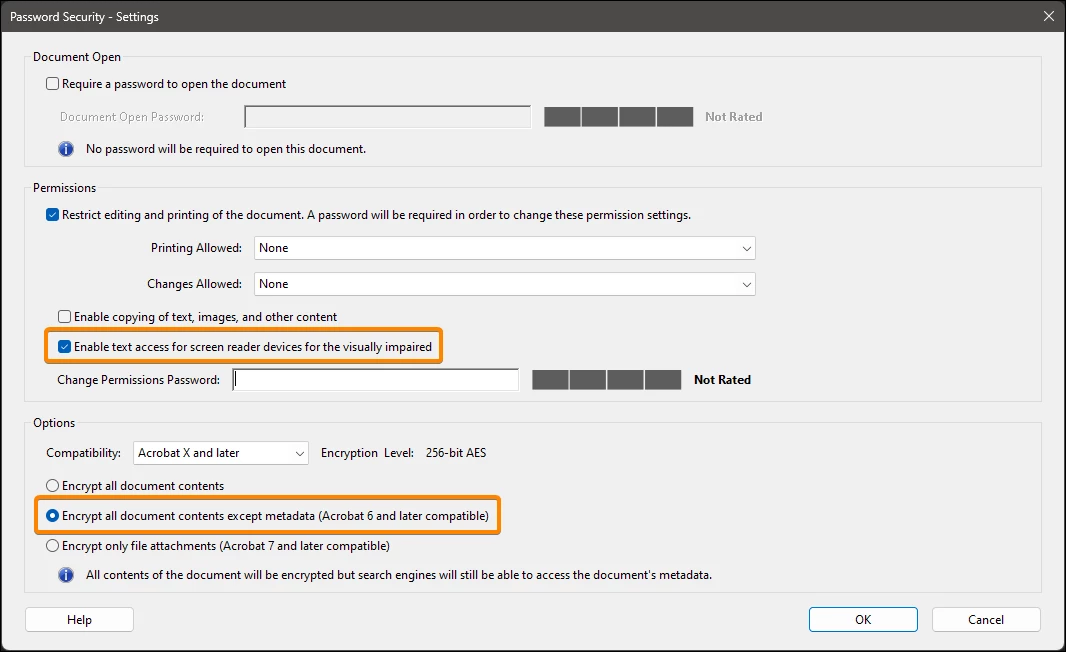
Be sure to check these options.


2 replies

JR Boulay
Community Expert
JR BoulayCommunity ExpertCorrect answer
Community Expert
February 8, 2024

Be sure to check these options.


Acrobate du PDF, InDesigner et Photoshopographe
Participant
February 9, 2024

Thank you so much for your response! selecting the 'encrypt all doument ....' radio button made it work 🙂

Amal.
Legend
February 8, 2024

Hi @Venkata26849274t0yh
 
Hope you are doing well and sorry to hear that
 
Is this an issue with a particular PDF file or with all the PDFs? Please try with a different PDF file and check. If the file is stored on a shared network/drive please download it to your computer locally and then try again.
 
What is the version of the Acrobat DC you are using? To check the version go to Help > About Acrobat and make sure you have the recent version 23.08.20470 installed. Go to Help > Check for updates and reboot the computer once.
 
Also try to repair the installation from the help menu (Win Only) and see if that works.
 
Let us know if you  experience any trouble and need more help.


~Amal

Participant
February 9, 2024

Thank you so much for your response!