


Participating Frequently
September 12, 2023
Answered

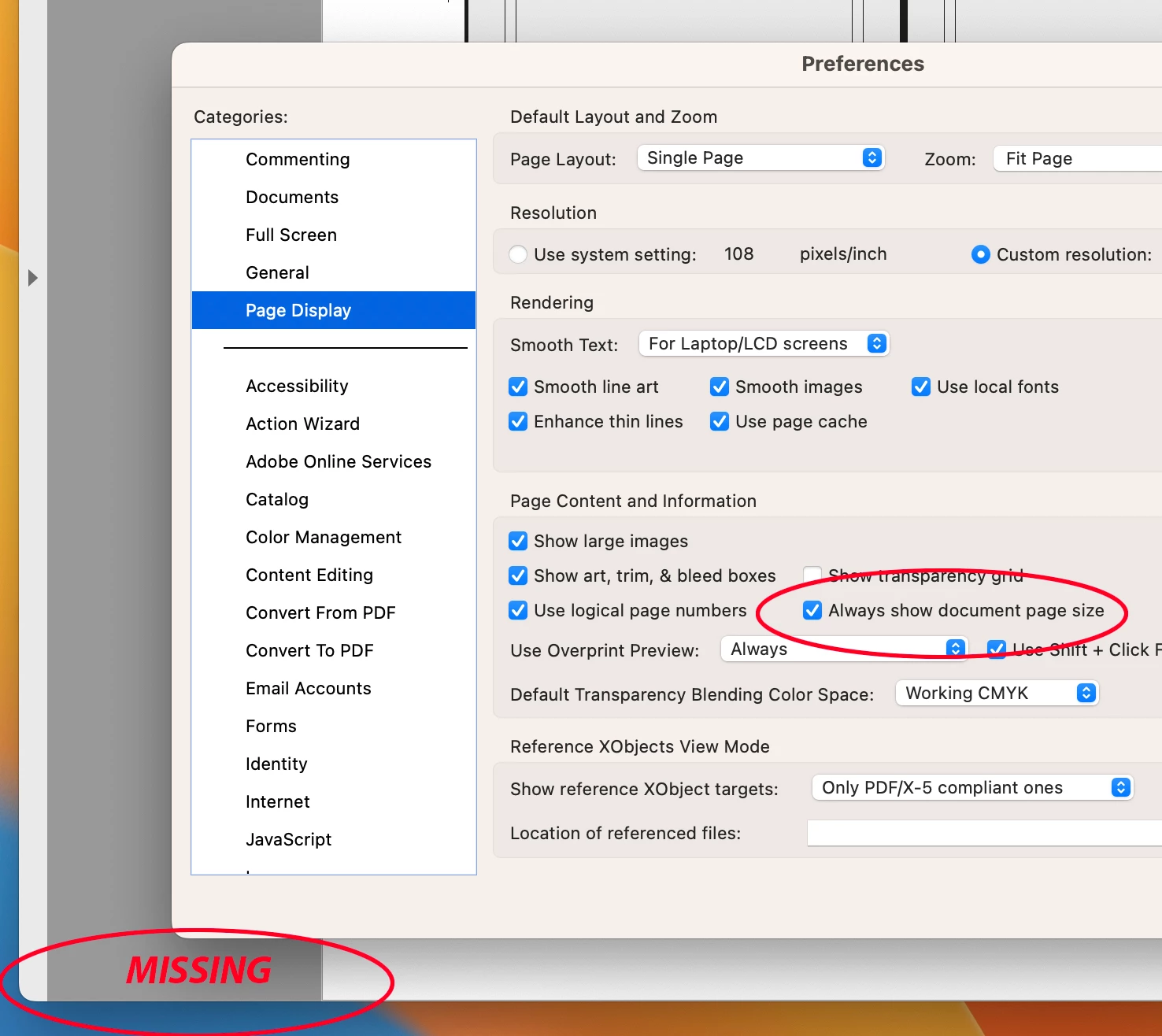
"Always Show Document Pages Size" in "Page Display" preference is suddenly not working !!!

  • September 12, 2023
  • 54 replies
  • 60847 views

I always rely on the Document Page size in the lower left frame bar of any and all PDF windows.  For some reason, today it is gone.  I have restarted Acrobat, rebooted my machine.  I have even deleted the Acrobat preferences and let it create a new preference file.  No matter what, this check box clicked or not clicked, does not yield me what I have relied on for many years.


Thoughts please.


Acrobat DC for Mav. v 2023.006.20320


Correct answer AJaycup

The solution is to go to the menu tab, down to view, then select "Disable New Acrobat". This reverts to Adobe UI before it was made to be garbage and will display the page size all the time. As far as I can tell, all the features are still there as well.

54 replies

Participant
September 19, 2023

Spent quite some time doubting myself, my machine, rebooting, restarting, checking boxes, unchecking boxes. WHY would you change this? Bring it back, please.

Participating Frequently
September 18, 2023

If our only current workaround to this annoying situation is having the setting for 'Always show document page size' unticked/OFF, to allow for hovering page sizes to show, how will we know if they ever fix it?  hahaha *frustratedlaughter*

Hoping this is fixed soon.

Participant
September 18, 2023

this "upgrade" SERIOUSLY sucks! This has no benefit in my production enviroment either! Did anyone there think to ask anyone who works daily in this software? You just made my job harder. I agree with everyone below...glad to be retiring in a few months!!

Participant
September 18, 2023

This is terrible! Change it back.

Participant
September 18, 2023

This is completely unacceptable from Adobe. Please find a way to give us the ''always show page size'' option back!

RoyB4519559
Participant
September 18, 2023

Not only has the update broken perfectly fine features, Acrobat Pro seems to be the only cloud app that updates itself, regardless of auto-update settings. Adding insult to injury, it also, so VERY conveniently, is the only cloud app that doesn't have an "Other versions" option for installation so we could revert to an actually more useful version. It's the forced update and nothing else. Bad practice all the way around, Adobe.

Participant
September 18, 2023

Dear Adobe support, please pay attention, THIS IS IMPORTANT ! Please fix the "always show document page size" !

rickselfok
Participating Frequently
September 18, 2023

My question is - WHY?

I'm sure the secretaries printing church bulletins of the Word documents as "desktop publishing" through PDF don't miss that option. I guess that's the way Adobe is leaning.

Participant
September 15, 2023

Please bring it back and atleast put it into the "Enable Old Acrobat" so we dont have to hover (who thought of this in the first place). The page size in lower left corner has been there I belive since the 90's.

PLEASE BRING IT BACK FOR US PREPRESS USERS!!!

JamT2000
Participating Frequently
September 18, 2023

There is a menu item - View>Disable New Acrobat. Which brings back the older tool bars.

Can confirm that switching 'Always show document page size' OFF, switches ON the bottom left hover page size.

It's only a workaround for now I hope…

Participating Frequently
September 18, 2023

What people on here want is for the page size to be there permanently!

I've tried this but it is still the hover option and NOT the permanent page size.

Participant
September 15, 2023

Hey Adobe fix this quickly we need this feature, or at least let us roll back to a previous versions that have it. And generally can you stop messing with your apps all the time, its the same crap with every update.

Participating Frequently
September 15, 2023

Our group is having the same issue. Page size not honoring 'always show', scroll bars not apprearing, and pitstop issues as a result of v 2023.006.20320


We were going around our group and turning off acrobat's auto-update, hoping stop the pain for those that had not already been auto-updated. We ran into one associate who had the latest version, we turned off the auto-update, and a few minutes later he said "it's auto-updating again?" When that was done, he was actually back on the previous version, not the broken one. And in being the older version, all of the "issues" were back to normal.


Maybe, just maybe, Adobe has pushed out a auto-downgrade? Has anyone else seen this happen?

rickselfok
Participating Frequently
September 15, 2023

I really don't think Adobe really gives a crap about us, the end users. How much space did that take up? I've been in Prepress for over 30 years and this "improvement" takes the cake. Maybe ASK your end users what WE want, not what you think is good for us.

John Cee714
Participating Frequently
September 15, 2023

This is horrible. Hovering does not work either!!!