

santhoshr29800103
Known Participant
July 25, 2019
Question

Annotated pdf has some discrepancy in formatting with PC and Mac machines

  • July 25, 2019
  • 8 replies
  • 6330 views

Dear Team,

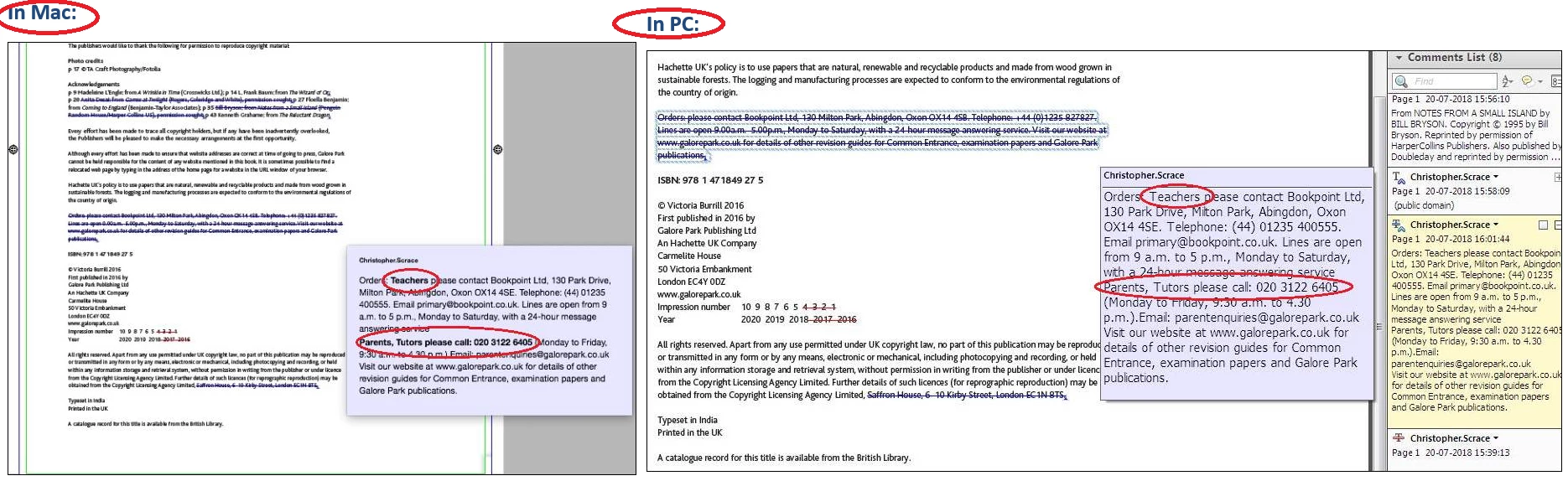
Annotated pdf has some discrepancy in formatting with PC and Mac machines. Originally this PDF created with annotations text in Bold format. If we open the pdf in Mac, some words showing in original format like Bold but if we open the same PDF in PC all text showing in Regular characters (Not in BOLD). We have checked with higher version Acrobat XI in both Mac and PC’s. Please refer below screenshot for example.
Thanks

Santhosh

This topic has been closed for replies.

8 replies

Legend
August 10, 2019

You posted a file that isn’t bold on Mac. I give up.

Legend
August 6, 2019

You have not answered my question. I think we need an answer, not more downloads.

santhoshr29800103
Known Participant
August 6, 2019

Sorry for late reply, i have wrongly uploaded the PDF file. I am also not gettig bold formatting.

Please try this updated link:

Adobe Document Cloud

Bernd Alheit
Community Expert
Community Expert
August 6, 2019

It is correct that you did not get the bold format.

Legend
August 6, 2019

I did download it. Did you, actually download it, from your own link? (NOT ANY IDENTICAL FILE!!)

santhoshr29800103
Known Participant
August 6, 2019

Could you please try to download the pdf in .zip format in below link:

Adobe Document Cloud

Legend
August 5, 2019

I have tried your link on Mac and there is no bold for me. Have you tried your own link? Please try the link NOT just a file that you KNOW to be identical. Strange things happen.

santhoshr29800103
Known Participant
August 6, 2019

No, please download it in your local then try to check. You will get the Bold formatting as mentioned in my original screenshot.

Bernd Alheit
Community Expert
Community Expert
August 6, 2019

The bold format is not available in the PDF file!

Legend
August 1, 2019

Since Mac and Windows Acrobat and Reader can both do this fine, Focus on two main Possibilities:

1. Perhaps...There is s problem with how you transport the files from Mac to Windows. Do your own experiments: make an annotated file with bold on Mac and move it yourself to Windows. What happens?

2. Perhaps... There is a problem with the way the client annotates these files. To get these checked may need you to have a file you can share publicly.

santhoshr29800103
Known Participant
August 3, 2019

Please check the PDF in PC and MAC from the following path:

Adobe Document Cloud

Bernd Alheit
Community Expert
Community Expert
July 31, 2019

How does you add the bold text in the annotation?

santhoshr29800103
Known Participant
August 1, 2019

There is an option to add the bold text in annotation as in below.

I don't know how my client was applied bold in annoation. Anyway if the bold is applied via any methoed in annotation it should be view in all system like PC and MAC. Why the Bold characters viewed in MAC and it has changed to regular while openend in PC.

Bernd Alheit
Community Expert
Community Expert
August 1, 2019

Using Acrobat Reader DC I can't see this issue.

Legend
July 29, 2019

Thank you for the detail. I was thrown by the "IX", because Roman numerals weren't introduced until 10.0. So I read it as XI. Anyway, I did some tests.

I found a copy of 9.0, and made a bold comment. Worked.

Opened it in 10.0, still worked.

Opened it in the current version, 2019.012.20035, worked.

I don't have any XI currently installed to test it.

Clearly, though, Adobe didn't actually get rid of the function.

One idea is to use Ctrl+E and see if the style appears.

Maybe it didn't work in XI. Is there any particular reason you are using obsolete versions (versions up to 11 are end of life)?

santhoshr29800103
Known Participant
August 3, 2019

Please check the PDF in PC and MAC from the following path:

Adobe Document Cloud

Meenakshi_Negi
Legend
July 25, 2019

Hi Santhosh,

Thank you for reporting this issue.

As you have mentioned above, you are using the Acrobat XI, which is an old and unsupported version of the application.

Could you please once check the PDF in the Adobe Acrobat Reader DC application? You can install the application from here Adobe - Adobe Acrobat Reader DC Distribution

Check if you can replicate the same behavior on Reader DC.

Could you please share the Acrobat XI and OS version on both the machines?

To check the application version, refer to the steps provided here Identify the product and its version for Acrobat and Reader DC

Let us know how it goes.

Regards,

Meenakshi

santhoshr29800103
Known Participant
July 26, 2019

Hi Meena,

Based on you suggestion i have checked it through Adobe Acrobat Reader DC application but the result does not changes anything. It lloks same as said in my previous screenshot. Bold formattings are missing and looks a regular fonts. Anyway i sharing the screen shot of PDF opened in Adobe DC Reader.

Thanks,

Santhosh

santhoshr29800103
Known Participant
July 26, 2019

Hi Meena,

Here is the configuration details of Acrobat XI and OS version on both the machines:

In PC

Windows Version: 7

Adobe Acrobat Version: XI (11.0.23)

In MAC

MAC Version: 10.12.6

Adobe Acrobat Version: IX

Thanks,

Santhosh