
Participant
August 19, 2022
Answered

Annoying Adobe Popup in Acrobat Pro

  • August 19, 2022
  • 1 reply
  • 607 views

This pops up everytime I open and go to work with the AcrobatPro programme

Is there anyway to turn this super annoying interruption off? I can't seem to see a setting check that would stop this, but when paying out for professional software, I wouldn't expect to see this type of thing without having the ability to turn it off.


Appreciate any help given.

.
This topic has been closed for replies.
Correct answer JR Boulay

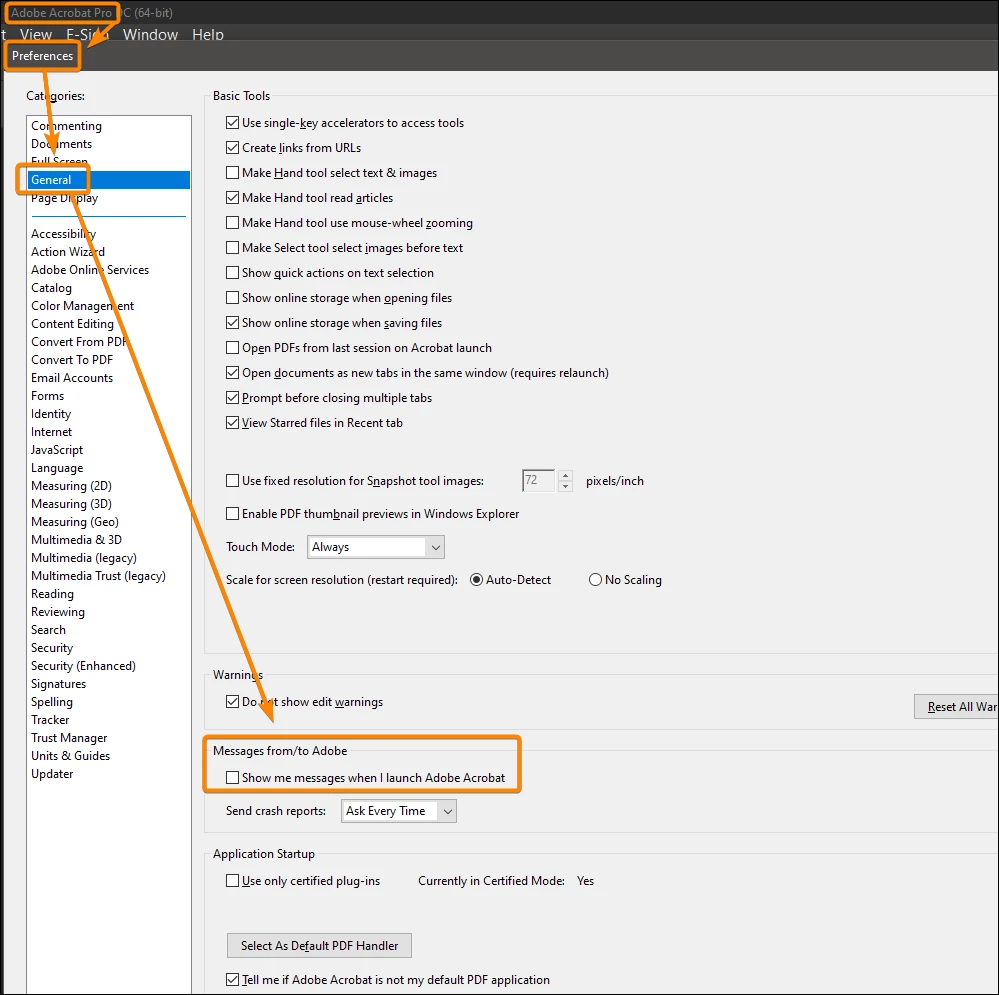
You will find this option in the Preferences:


1 reply

JR Boulay
Community Expert
JR BoulayCommunity ExpertCorrect answer
Community Expert
August 19, 2022

You will find this option in the Preferences:


Acrobate du PDF, InDesigner et Photoshopographe
Lambo75Author
Participant
August 19, 2022

Thank you - I was sure I had turned that off, but upon checking it was indeed ticked.


Thanks for the reply, appreciate it.