


YourDaddy
Participant
September 21, 2018
Answered

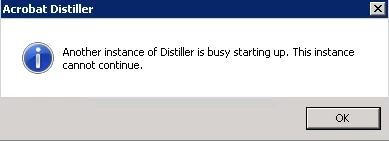
Another Instance of Distiller is Busy Starting Up

  • September 21, 2018
  • 2 replies
  • 22126 views

Hello

I have Excel Report with Macros which creates multiple PDF files using Acrobat Distiller. It creates couple of PDF files and then stop after that giving below error message. I have tried to reboot computer, but it still didn't help. Is there anything else i should try? Acrobat version is 9.
Thanks

Correct answer AkanchhaS8194121

Hi Rajat,

Sorry for the delay in response to your query.

If you are still looking for the solution to this problem, then we would suggest you to try closing the Acrobat Distiller instance (if you find more than once instance) from "Task Manager" and see if that helps.

Right click Task Bar>Open Task Manager>Processes>select process and "End Task"

Regards,

Akanchha

2 replies

Red Ink Writes
Inspiring
August 15, 2024

I recently upgraded my computer to Windows 11, and now have this same pop-up when I restart my machine. The only thing in Task Manager that uses the word "Acrobat" is the 32 bit Acrobat Update Service. I have an Adobe Content Synchronizer and Adobbe Crash Processor and other than that I have 13 items that all start with "Creative Cloud." 

Something just isn't right with Acrobat/Distiller, and that was the main reason I upgraded to Windows 11 - hoping to alleviate some of the slowness to any MS app that uses Acrobat and the constant freezes in Acrobat itself. This is an improvement over that behavior, but there's still something going on.

AkanchhaS8194121
AkanchhaS8194121Correct answer
Legend
November 13, 2018

Hi Rajat,

Sorry for the delay in response to your query.

If you are still looking for the solution to this problem, then we would suggest you to try closing the Acrobat Distiller instance (if you find more than once instance) from "Task Manager" and see if that helps.

Right click Task Bar>Open Task Manager>Processes>select process and "End Task"

Regards,

Akanchha

Participant
May 5, 2024

This used to work, however, now I cannot find any process in Task Manager that shows Distiller running. Do I even need this function? I've had a temporary setback and had to put my Pro subscsription on hiatus for now. If Distiller only comes with the paid subscription, why when I uninstall it does it keep reappearing? It starts up EVERY time I boot up. Any suggestions? Thank you