



SuzzyFlamingo
Inspiring
March 13, 2025
Answered

Another printing question

  • March 13, 2025
  • 1 reply
  • 360 views

I apologize if I asked this before, but it has been a tough week and my brain is totally zapped.

I have a doc which (originally) is A4 portrait. I want to print 4 instances at half size, 2 on each side of a landscape A4 paper. Now I know I could do this by telling it to print pages 1,1. But there is only one page in the PD file so it greyed out those options:

So
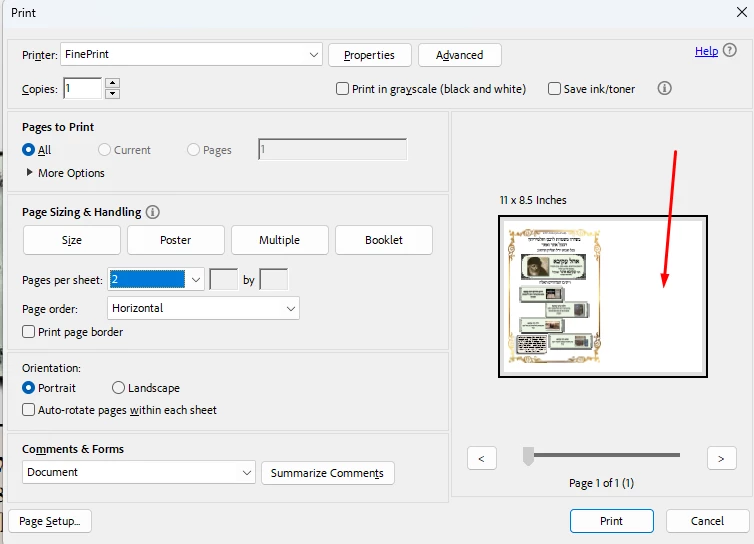
So as you can see, it is only giving me one instance and I want two on each side of the page (have auto-duplex printer)


How to?

Thank you

Susan Flamingo

Correct answer Bernd Alheit

You can use a script:

var pp = this.getPrintParams();
pp.interactive = pp.constants.interactionLevel.full;
pp.printRange=[[0, 0], [0, 0], [0, 0], [0, 0]];
this.print(pp);

1 reply

Bernd Alheit
Community Expert
Community Expert
March 13, 2025

In Adobe Acrobat add one page and the option will be active.

SuzzyFlamingo
Inspiring
March 13, 2025

Thank you for your attention!

I thought of doing this, but it seemed like a superfluous workaround, and I was looking for something more elegant. Adobe could have allowed this after you chose multiple.

Bernd Alheit
Community Expert
Community Expert
March 13, 2025

The option is for documents with multiple pages.