Participant
April 12, 2024
Question

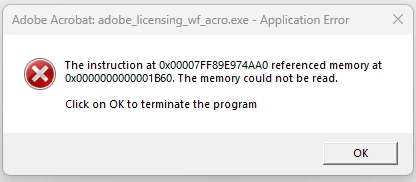
Application Error The memory could not be read

  • April 12, 2024
  • 3 replies
  • 3942 views

Acrobat crash at start up


This started happening about 2-3 months ago.

I have uninstalled acrobat and cloud, reinstalled with no luck. 

Let me know you thoughts on how to fix this

Thanks
 

This topic has been closed for replies.

3 replies

Adobe Employee
September 11, 2024

Hi @Dwaine359482384u94 
Please Update the Acrobat Application to the Latest version.
Relaunch the application and check if it is crashing.
If yes and if you are an Windows user. Please follow the below Troubleshooting steps.
1. Right click on Acrobat Shortcut from your desktop
2. Click on Properties.
3. Select Comatibility Tab and under that Uncheck an option called " Run the Progarm in Compatibility mode" >> Click on Apply and OK.

Amal.
Community Manager
Community Manager
May 17, 2024

Hi @Dwaine359482384u94 


Hope you are doing well.


Our engineering team requires the dump file for the crash to further investigate the issue, please share the requested dump file so we can isolate the issue for the fix.


~Amal

Participant
June 3, 2024

Hi, Good Afternoon


I manually updated Acrobat with no luck, same error


I created a dump file but the extension ends in .DMP, I can not upload a DMP file here. 


Any ideas ?


Thanks

Amal.
Community Manager
Community Manager
June 3, 2024

Hi there


You may upload the dump file to any cloud storage of your choice (Dropbox, Google Drive), create a link, and  share it with us for further investigation.


~Amal

Amal.
Community Manager
Community Manager
April 22, 2024

Hi there


Hope you are doing well and thanks for reaching out.


Would you mind sharing more details about the issue you are experiencing? What is the workflow/steps you are doing that lead you to this error? A small video recording of the same would be very helpful.


Also, make sure you have the recent version 24.02.20687 installed. Go to Help > Check for updates and reboot the computer once.


Let us know how it goes.


~Amal
