
Participant
July 25, 2024
Question

Arabic language not tagging properly

  • July 25, 2024
  • 1 reply
  • 327 views

Hi all,

I am trying to tag a PDF document in an Arabic language. However, when I create tags around the content, it is displaying as random characters.

How do I enable this PDF to tag this language properly?


Here is a screenshot of my source text and output:

Source:

Output:
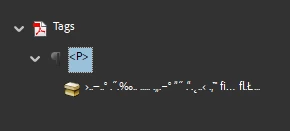
 

Any guidance would be greatly appreciated.

This topic has been closed for replies.

1 reply

S_S
Community Manager
Community Manager
August 23, 2024

Hi @DavidAV,


Hope you are doing well. Sorry for your experience with Acrobat!


This is strange and shouldn't be happening. However, I would be curious to know if the document language has been set to Arabic and the reading order changed to Right-to-left.


You can check for it by opening the document, going to Menu-> Document Properties-> Advanced tab, looking for the section that says "Reader Options," and changing the language to Arabic and Binding to Right Edge.


Once done, click "OK" and save the document. Rerun the Automatic Tagging process after following the above steps, and let me know if that works.

[screenshot attached for reference]


-Souvik