


January 14, 2026
Answered

Arial font shows weird symbols

  • January 14, 2026
  • 1 reply
  • 274 views

Hi.


I'm having an issue with a user who's PDF that shows the symbols below. They appear several times across several pages.

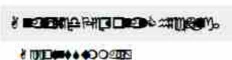
 

874538i6169FA94E3023F40.png

874546i2E430087318CC042.png


If I were to click on the "Edit PDF" tool, I see that the font is Arial. 
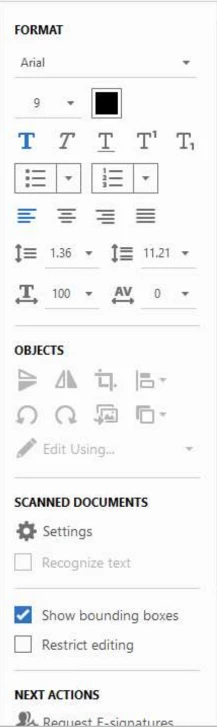
 

874539i7E477CC1069F5D96.png

I've read about the PreFlight Tool from other posts. I ran the PreFlight tool but received the following errors. I also saved the file under a different name.
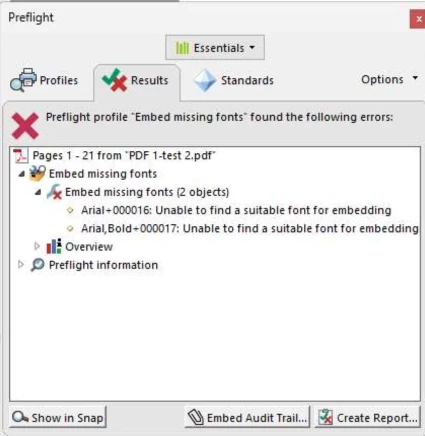
 

874540i6762A594C4916FCB.png

I've tried unchecking and checking "Rely on System Fonts only. Do not use document fonts" as well as updating to the latest version.


I'm not sure what else to do. I can edit the font to another font, then change back to Arial and it will be readable. However, this is happening on several 20 page documents from different users.


This user is using Adobe Pro - Enterprise, Version 2025.001.20997 | 64 bit

Windows 11 Business, Version 25H2


Correct answer

Hi @38258046, 


Thanks for the update. 
Arial fonts are usually available with the OS itself. You can check the font folder to see if the fonts are available. Additionally, you should verify the font permissions to determine if you are permitted to embed those fonts.

To check about how to embed fonts, please visit this help page: https://adobe.ly/3LGJx4y


Also, it is advised in situations like this to go to the source document and change the font used, and then convert the document to PDF format.

Best regards,
Tariq | Adobe Community Team


4. Try toggling “Rely on System Fonts Only.”

You already tried changing that setting, but in some cases, toggling it off then on again after a restart helps Acrobat refresh its font cache.


I re-toggled this setting on/off. Instead of restarting Adobe, I restarted the laptop and it worked! 


Thanks all. I'll keep this info handy in case it comes up again.

1 reply

Amal.
Legend
January 14, 2026

Hi there


Hope you are doing well, and thanks for the detailed report and screenshots — this type of font behavior usually comes down to how Acrobat is finding/substituting fonts in the PDF rather than a bug in Acrobat itself.


When a PDF doesn’t embed the font (Arial in this case), Acrobat must substitute it with a system font that matches the name in the file. If your system has multiple or corrupted versions of Arial, Acrobat might pick the wrong one, which can result in characters looking like weird symbols instead of normal text.

In your Edit PDF view, it says “Arial,” but Acrobat might still be substituting a different font at display time.

Things to try :
1. Check the Fonts tab in Document Properties

Go to File > Properties > Fonts to see which fonts Acrobat actually thinks are in the document.
If the font is not embedded, Acrobat has to map it to a system font, and that’s often where substitution issues come from.

2. Reinstall / repair the system’s Arial fonts

Sometimes there are duplicate or corrupted copies of Arial on the system.
Reinstalling Arial can help Acrobat find the right font.

3. Use Preflight to embed fonts

In Acrobat Pro, use Preflight > Fixups > Embed fonts to embed Arial into the PDF.
Embedding ensures the correct glyphs show up for every user, regardless of what fonts are installed locally.

4. Try toggling “Rely on System Fonts Only.”

You already tried changing that setting, but in some cases, toggling it off then on again after a restart helps Acrobat refresh its font cache.


Let us know how it goes.


~Amal

January 14, 2026

Thanks for the response Amal.


Here are all the fonts from the document properties:


874559i592EDF016EDF72C2.png

874560i565C0EE98580763A.png

Below are the only 2 fonts without (Embedded Subset). These 2 fonts are also the ones that come up in as errors in the PreFlight tool.

874561iCBF09160FF30465D.png


2. I can try downloading another Arial font. Do you have a recommendation where I can get it?


3. I used the PreFlight tool to fix the issue. I opened PreFlight, clicked on the blue wrench, clicked on Embed Fonts under Documents and clicked Fix. The screenshot is the result of the error.


4. I've tried restarting Adobe with both checking and unchecking Relying on system fonts. I'll try restarting the machine in between changing both settings 

Legend
January 15, 2026

Hi @38258046, 


Thanks for the update. 
Arial fonts are usually available with the OS itself. You can check the font folder to see if the fonts are available. Additionally, you should verify the font permissions to determine if you are permitted to embed those fonts.

To check about how to embed fonts, please visit this help page: https://adobe.ly/3LGJx4y


Also, it is advised in situations like this to go to the source document and change the font used, and then convert the document to PDF format.

Best regards,
Tariq | Adobe Community Team