
Participating Frequently
July 7, 2019
Answered

Asking how to stop the"Reopen Closed PDFs" message from appearing?

  • July 7, 2019
  • 13 replies
  • 42562 views

Hi,

Every time I open a PDF document I see a blue background box in the upper right corner with white lettering, "Reopen Closed PDFs  Your last Acrobat session ended abruptly.  Click Restore to open the PDFs from the last session."

I don't know if I am doing something wrong, or this is just another Adobe pop up that comes up on its own.  So, I have to go over and click on the "X" in the upper right inside the box to get it to disappear.

Thanking you in advance for your help.
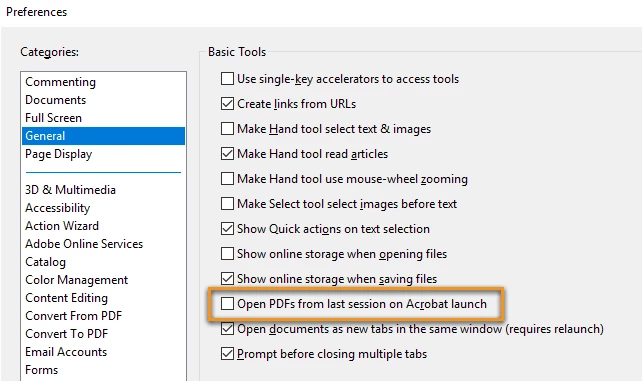
Correct answer Meenakshi Negi

It looked like it worked for me also. But when you open files and get a recent list, it comes back.

And recent files is USEFUL. I don't want to delete it, I want the persistent pop-up to go...

Thanks for checking.


Hi All,

We have released an update today for Adobe Acrobat 2015, Acrobat 2017 and Acrobat DC in which a new preference is added to enable or disable this capability. By default, the preference is disabled.

Please update the applicaiton latest version released for the application.

You may refer to the following link to check the latest versions available. Release Notes | Adobe Acrobat, Reader

For more details on the new update, please refer to the following help document What's new in Adobe Acrobat DC

Let us know if you have any questions.

Regards,

Meenakshi

13 replies

ls_rbls
Community Expert
Community Expert
July 8, 2019

This is interestingly challenging. I hope it has nothing to do with changing any keys or values in your Windows 7 registry.

LJE208Author
Participating Frequently
July 8, 2019

Hi,

I am sorry, I cannot say.  I don't think I've done anything to the Registry.  I update the browsers and my Epson Printer when called for and that is about it.  I wouldn't even have any way of knowing what could have gone wrong with the Registry.  It is scary to me because we area always told not to mess around with the Registry.  I guess I'll just have to live with the pop up every time I open up a new PDF file. 

Thank you so much for trying to help me.

ls_rbls
Community Expert
Community Expert
July 7, 2019

Maybe turning off messages and notifications can help.

See if this other slide works for you:

LJE208Author
Participating Frequently
July 8, 2019

Hi again,

It still popped up! I unchecked the message as you show above.  That check mark keeps coming back too; the one I uncheck in the Preferences for the "show me messages when I launch Adobe Reader...." I click on the okay, but after closing out of a PDF document and going to the next one and opening it up, the Reopen closed PDFs pops back up again.  So, it must be a 'glitch' somewhere else.  Thank you so much for trying to help me.      

ls_rbls
Community Expert
Community Expert
July 7, 2019

It looks like you are working with multiple documents at the same time and when you closed the program, changes to those  documents weren't saved before shutting down the application.

Llike in some Internet browsers, you can set the browsing app to restore the last view if you had it opened with multiple tabs.

It is useful in the case that the user may need to relaunch all those browsing tabs again. When you use the last view restore there is no need to open each browsing tab  by typing the URL on each window individually, for example.

So the message that you are getting is a normal "restore last view" seeting that basically allows the user to review the files that were last opened, and  allowing the opportunity to work on the file(s) and re-save  them with additional  changes. It is convenient  if,  in the event  of a computer failure,  some work was lost (hence the "ended abruptly" message).

If you don't want to see this meesage, verify if the slide below helps take care of that:

LJE208Author
Participating Frequently
July 7, 2019

Hi,

I read through all you have written so thank you very much.  I went through your steps and the restore last view settings is unchecked.  It had been like this being unchecked. 

I never had this message before, so when it pops up I "x" out of it.  I had been using the "x" in the far right upper corner to close out the PDF file, so is that incorrect to do?  Thank you.  I am using a Windows 7 Desktop; not a cell phone by the way so for me the term "apps" doesn't really apply.