

Yalie98
Participant
November 2, 2020
Answered

Assign a default font to Adobe DC?

  • November 2, 2020
  • 5 replies
  • 11814 views

Newbie here...In Adobe Acrobat DC, it seems the default font is Minion Pro (12pt). Is there a way to change this to Arial 12? I need an easy way as I don;t code or know scripts....I am an occassional user, using Acrobat DC when I get docs that require editing in a PDF domain but for the life of me, I can't make Arial 12 stick as my default font. Thanks for assisting me...
    This topic has been closed for replies.
    Correct answer Dov Isaacs

    Although I would agree that in general you should seriously limit text editing or adding text within Acrobat (neither the PDF file format nor the products such as Acrobat are really designed for after-the-fact text manipulation), there is a way to set the default.


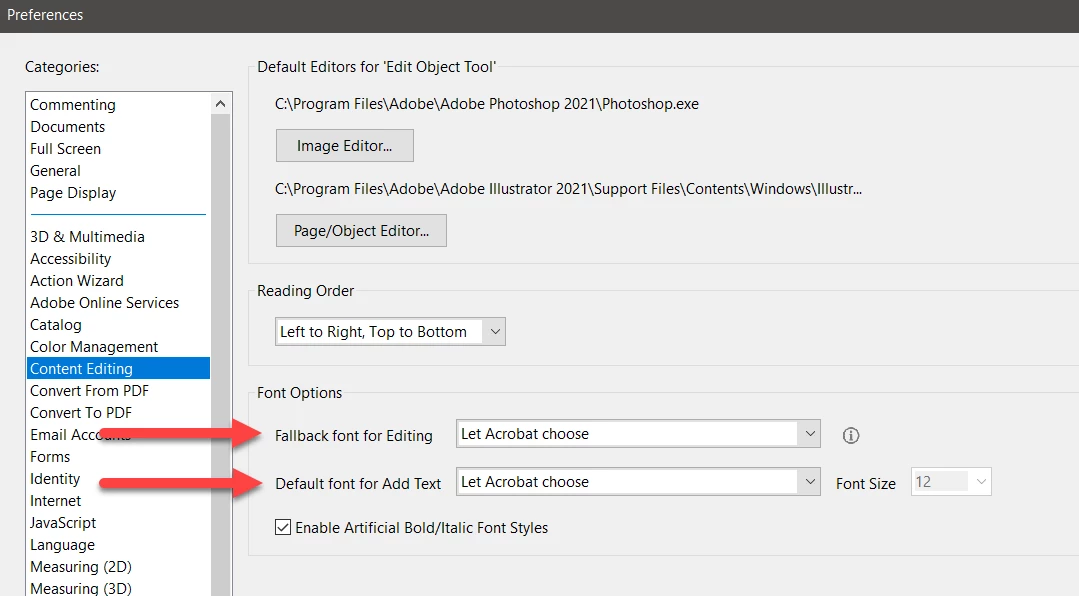
    Go to Preferences=>Content Editing and choose whatever font you want for either Fallback font for Editing or specifically for adding text, Default font for Add Text. Then press OK, exit Acrobat and then restart Acrobat. The new defaults are now in effect.


    This should meet your needs (and FWIW, I did try this and it did work).


    5 replies

    GrievousAngel
    Known Participant
    January 9, 2021

    It is strange for so many users to suggest not to compose text in Acrobat. It's obviously not a word processor by design but if you find yourself in Acrobat typing, one should expect basic text editor support. I use Acrobat all the time trying add text to an image or another PDF doc and always find myself having a difficult time doing basic document modifications adding text and graphics. It does neat stuff but is aackward at times. The default fonts are handled is strange. Anyways . . . 


    Dov Isaacs
    Dov IsaacsCorrect answer
    Legend
    November 2, 2020

    Although I would agree that in general you should seriously limit text editing or adding text within Acrobat (neither the PDF file format nor the products such as Acrobat are really designed for after-the-fact text manipulation), there is a way to set the default.


    Go to Preferences=>Content Editing and choose whatever font you want for either Fallback font for Editing or specifically for adding text, Default font for Add Text. Then press OK, exit Acrobat and then restart Acrobat. The new defaults are now in effect.


    This should meet your needs (and FWIW, I did try this and it did work).


    - Dov Isaacs, former Adobe Principal Scientist (April 30, 1990 - May 30, 2021)
    GrievousAngel
    Known Participant
    January 9, 2021

    I've done that seeveral times and the font 'Myami Pro' jumps back in with the wrong text size. I guess it works but it seems buggy. Acrobat is a great tool but it needs to flow bett'er. Not closing functional sections properly upsets Acrobat and me.

    Dov Isaacs
    Legend
    November 2, 2020

    This is not a question with regards to the Adobe Fonts service. Moving this thread to the Acrobat community.


    - Dov Isaacs, former Adobe Principal Scientist (April 30, 1990 - May 30, 2021)
    Legend
    November 2, 2020

    Above all DON'T MAKE DOCUMENTS IN ACROBAT. That's a terrible mistake, which Adobe marketing tricks many people into thinking is a great idea.

    Participant
    January 28, 2024

    What would you suggest (if not Acrobat)?

    Abbyy? InDesign?

    Specifically for scanned pages to crete new PDF [translating fonts natively, i.e. same as source documents -- not always Minion-hybrid, every page]


    LinSims
    Community Expert
    Community Expert
    November 2, 2020

    This is not an Acrobat DC function. The default font has to be set in the application used to create the original source that was converted to PDF. So if you're using Word, you have to edit the Normal.dotm and/or your document template file (*.dotx) to change the default font for Word documents created with that template. If you're using an Adobe product such as Photoshop or Illustrator, let us know and someone will move this to the appropriate forum.