
Assigning "NO VALUE" to a "RADIO BUTTON CHOICE"
Thank you for all the insight and help this community has provided... and continues to provide.
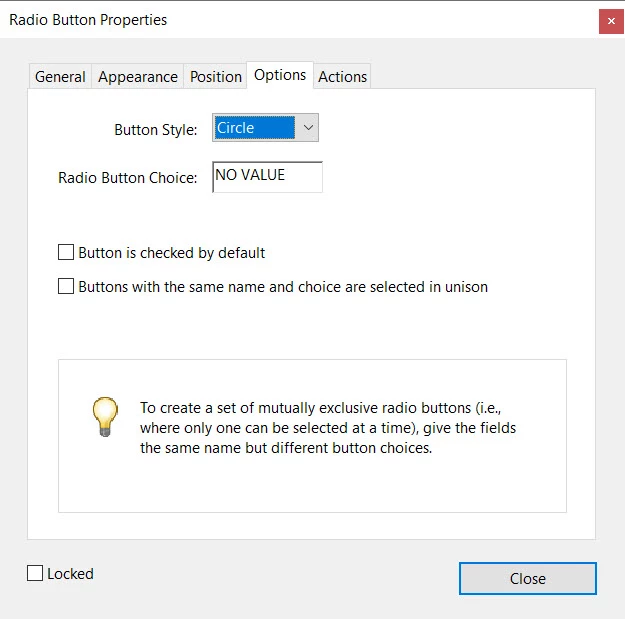
QUESTION: What must be entered into the "Radio Button Choice" for a radio button to be equivilant to "No Value" as opposed to it being equivilant to "0"?
INTENT: Provide an average score for only "applicable" categories.
EXECUTION: Create a form which allows for the user to chose one of 4 buttons which vary in score (0,1,2,3, NA) for each category.
An average of each score will then be displayed.
Since some categories are "Not Applicable" they need to have "No Value."
If the "Not Applicable" categories have a value of "0," the final average off all the scores will be improperly skewed
EXAMPLE:
For each activity in which you participated, please provide a rating. 0 = Horrible, 1= Needs Improvement, 2 = Pretty Good, 3 = Awesome, NA = Not applicable, I didn't do this activity
a. Swimming: 0 - 1 - 2 - 3 - NA
b. Painting: 0 -1 - 2- 3 - NA
c. Camping: 0 -1 - 2- 3 - NA
d. Cooking: 0 -1 - 2- 3 - NA
If the score comes back as follows, 3 three "3"s and an "NA," with "NA" being equal to "No Value,"
a. Swimming: 0 - 1 - 2 - 3 - NA
b. Painting: 0 -1 - 2- 3 - NA
c. Camping: 0 -1 - 2- 3 - NA
d. Cooking: 0 -1 - 2- 3 - NA
The final aveage score will be "3"
However, if the "NA" value is "0," the final aveage score will be "2.25"
"2.25" is obviously not an accurate reflection of the final average "Awesome" grade which should be recorded.
Thank you in advance for any solution and support.
 AdChoices