
Participant
August 31, 2020
Question

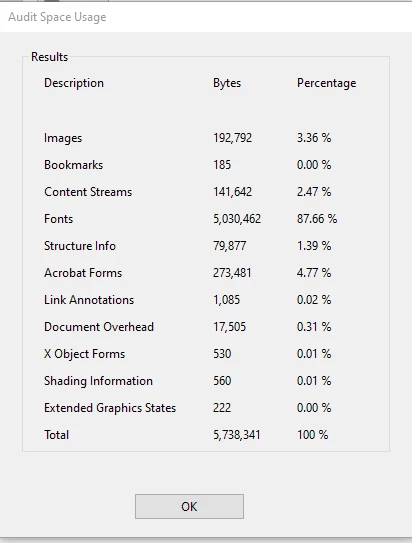
Audit space usage is 88% Arial fonts!

  • August 31, 2020
  • 5 replies
  • 3469 views

So I am trying to reduce the size of my file. It was 8mb and then after running the optimize pdf tool, now 5.7mb. I have been researching and learinng about embedding fonts. The document used a weird font and so I changed everything to Arial figuring it's so universal that the file size will drop dramtically.
However it didn't work.

When doing to audit space, I have 88% of my document is still fonts: 
 

And if I take a look at the fonts being used in the document, the weird font had indeed gone, however there seems to be multiple Arial fonts that are embedded too:
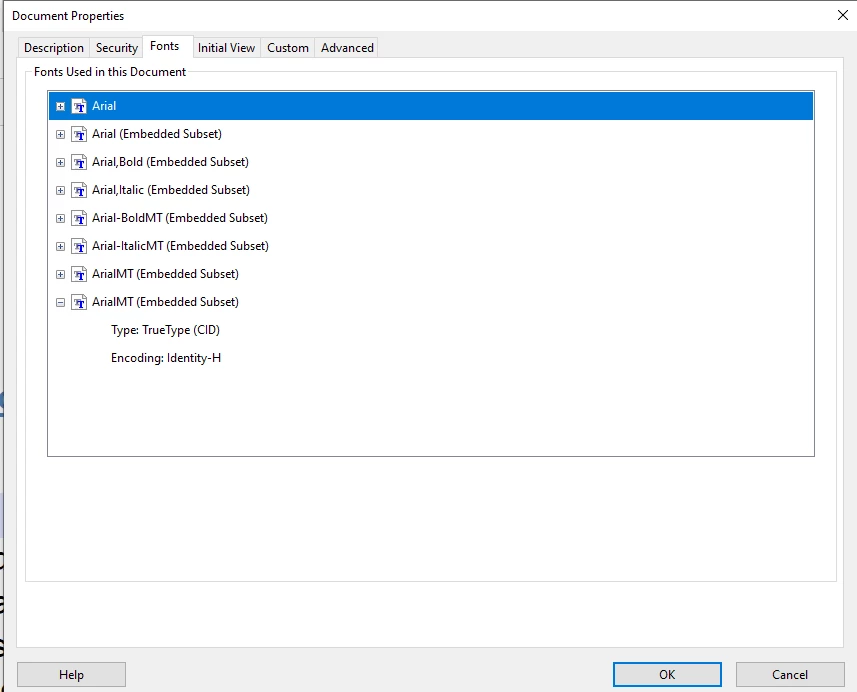


Any idea how to not have fonts embedded creating such a large file size? 

Cheers guys! 

This topic has been closed for replies.

5 replies

Legend
August 31, 2020

I see this is a fillable form. Since it is, the form fields use fonts too. The form field fonts

* cannot be unembedded

* always embed as full fonts 

* do not show in properties

* aren't affected by the optimizer

Arial is a particularly large font too. You are stuck with them unless (and perhaps even if) you use the form field editor.

JR Boulay
Community Expert
Community Expert
August 31, 2020

How did you create this PDF?

With which software?

Acrobate du PDF, InDesigner et Photoshopographe
try67
Community Expert
Community Expert
August 31, 2020

Using Arial is not any different from using any other font. It's not one of the fonts that come built-in in the application, so it has to be embedded, and since you used various variants of it in your file, all of them have to be embedded, either fully or partially. Hence the large file size.

Mark5C47Author
Participant
August 31, 2020

Nesa Nurani
Community Expert
Community Expert
August 31, 2020

Hi, did you try going to Save as Other->Optimized PDF-> Fonts and see if you can unembed fonts?

Mark5C47Author
Participant
August 31, 2020

Yep, that was the first thing I tried. You can see in the screenshot that there is [supposedly] no embedded fonts:


Nesa Nurani
Community Expert
Community Expert
August 31, 2020

Not sure what else you could do except make new file from begining and choose only 1 font from start. I have read somewhere even if you look and try at other fonts they are still saved to your file and it can really fast make your file large. I once had 8mb file and then i decided on just one font and start file from begining and it was everything same but it was now only 100kb. I also read somwhere that it's better to use Save As then just Save because it clean file of unnecessary stuff.