
Participant
April 5, 2024
Answered

Auto-fill Item Text from drop-down (not export value)

  • April 5, 2024
  • 2 replies
  • 845 views

I have a drop down list where option item "ABC" = export value 5; "DEF" = export value 6, so on. 


In another portion of the form I need item text "ABC" to be auto-filled and in another I need the export value to be auto-filled. 


I know how to auto-fill the export value. I can't figure out how to auto-fill the item text value. Whatever I try just keeps returning the export/numerical value. 


Example what's needed: 
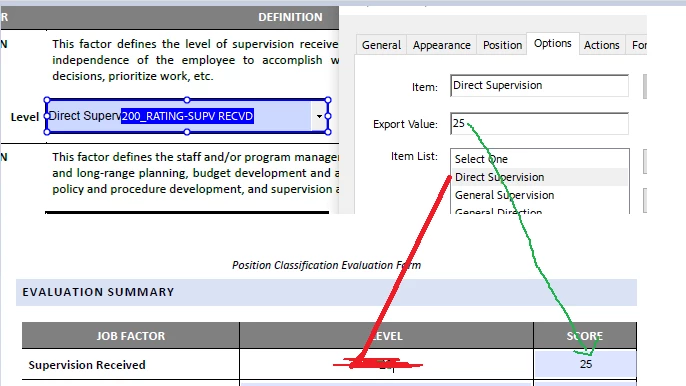
 

Where I'm Stuck: formula for "level" column, I've got "score" column. 

 

This topic has been closed for replies.
Correct answer Thom Parker

The value of a list field is always the export value. To get the display value use the "field.getItemAt()" function. 

https://opensource.adobe.com/dc-acrobat-sdk-docs/library/jsapiref/JS_API_AcroJS.html#getitemat


To use the function the index of the selected item is needed. This value is found in the "field.currentValueIndices" property.


So, the calculation script for the display value is written like this.


var oLstFld = this.getField("...long name...");
event.value = oLstFld.getItemAt(oLstFld.currentValueIndices, false);


2 replies

try67
Community Expert
Community Expert
April 6, 2024

Under the Validation event of the drop-down field enter the following:


this.getField("Text Field Name Goes Here").value = event.value;

Participant
April 6, 2024

Thank you!

Thom Parker
Community Expert
Thom ParkerCommunity ExpertCorrect answer
Community Expert
April 5, 2024

The value of a list field is always the export value. To get the display value use the "field.getItemAt()" function. 

https://opensource.adobe.com/dc-acrobat-sdk-docs/library/jsapiref/JS_API_AcroJS.html#getitemat


To use the function the index of the selected item is needed. This value is found in the "field.currentValueIndices" property.


So, the calculation script for the display value is written like this.


var oLstFld = this.getField("...long name...");
event.value = oLstFld.getItemAt(oLstFld.currentValueIndices, false);


Thom Parker - Software Developer at PDFScriptingUse the Acrobat JavaScript Reference early and often
Participant
April 5, 2024

Thank you, I'll try this.