Participant
April 9, 2024
Question

Auto-hide or Dock Toolbar

  • April 9, 2024
  • 3 replies
  • 798 views

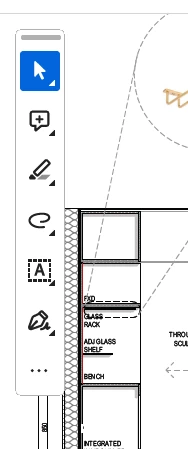
Can the Toolbar have an auto-hide or be docked to the sidebar so as not to obscure the document?
 

This topic has been closed for replies.

3 replies

Participant
April 25, 2024

The  floating toolbar is annoying. Who's idea was that? Someone did not do thorough enough UX research.  How do I disable the New Acrobat and continue to use the classic Acrobat?

Amal.
Legend
April 26, 2024

Hi there


Hope you are doing well.


To learn more about the new Acrobat, please go through the help page: https://helpx.adobe.com/acrobat/learn-new-acrobat.html


~Amal

Amal.
Legend
April 10, 2024

Hi @Anthony366318220scf 


++ Adding to the discussion


You may also share your feedback directly with the engineering team using the link https://www.adobe.com/products/wishform.html


~Amal

ls_rbls
Community Expert
Community Expert
April 10, 2024

Hi @Anthony366318220scf ,


I'm afraid the auto-hide is not an available feature for that floating toolbar at this time.


Based on your screenshot, however, it looks as if that document was zoomed in.


In which case, your observation is very valid, because everything over 100% magnification makes that toolbar be on top of the displayed document no matter where it is moved around.


I guess you've just discovered another reason to bring forward to the Acrobat developers about how troublesome the New Experience design actually is.


In which case, if this is something that is really disturbing the criteria of a desired workflow, just disable the New Acrobat and continue to use the classic Acrobat.
