
Auto Increment Alphanumeric Unique ID Field on Creation
Hello,
My company has used FileMaker to auto-generate a alphanumeric unique id in a field, which was easy because the program didn't need manual scripting to do so, just followed a similar process as outlined here: Resetting-an-auto-enter-serial-number-in-FileMaker. We are phasing out FileMaker, so I'm trying to see if it's possible to replicate the same auto-generated alphanumeric field on creation of a fillable form in Adobe Acrobat Pro DC.
My company used FileMaker form to track procurement purchases. The FileMaker form was accessible to customers via the web, and everytime someone opened the .fmp file, the form would auto-generate a "Ticket Number", which our financial office used to track each individual purchase order in another system (see screenshot example).
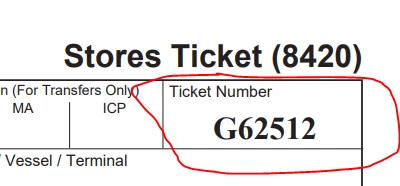
I'm wondering if there is some script/setting in Adobe Acrobat Pro DC that can be set to auto-generate this alphanumeric number within the following parameters:
- 6 character limit (1 letter and 5 digit number)
- when the number reaches max 99999 (max 5 digits), then the letter increments to next letter in alphabet and the number starts back at 00001
- Lock field so customer cannot change
I'm a total beginner at JavaScript or knowing how to use fillable forms in Adobe Acrobat Pro DC, so instructions on where to copy and paste script and/or settings to would also be very helpful.
Thank you!
Keisha
 AdChoices