
Participant
December 13, 2023
Question

Auto-Populate Field Based on Drop-Down Choices

  • December 13, 2023
  • 2 replies
  • 470 views

The more I learn, the more I realize how very little I know.  I swear - I've read through all the auto-populate threads.  I just don't know JS well enough to fight my way out of it.  Here is what I need:


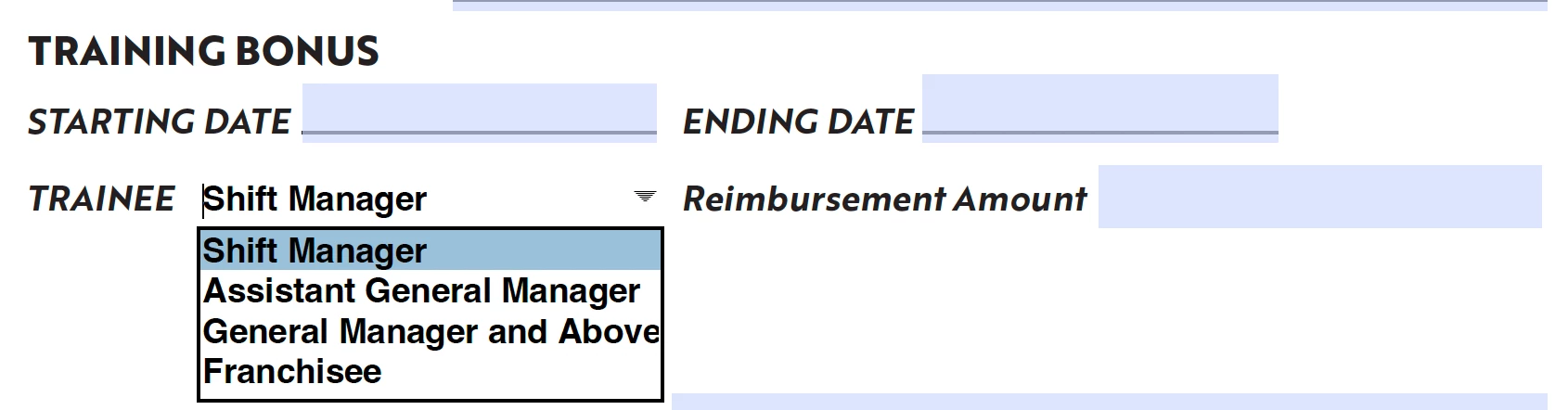
User chooses which Trainee applies. Options are Shift Manager, Assistant General Manager, General Manager and Above, and Franchisee.

Based on which Trainee is chosen from the drop-down menu, the field Amount is automatically filled in. Shift Manager, Assistant General Manager, and General Manager and Above have set values, but the Franchisee choice will be fillable by the user.


I've attached an image of the document. If this has a really simple answer to someone, you're smarter than me. Help! Thanks in advance.
This topic has been closed for replies.

2 replies

Nesa Nurani
Community Expert
Community Expert
December 14, 2023

If you set values as export value, for dropdown choices, you can use something like this as custom calculation script of the field where you want to show value :

if(this.getField("Dropdown").valueAsString !== "Franchisee")
event.value = this.getField("Dropdown").value;

Don't give "Franchisee" any export value.

Change "Dropdown" to your actual dropdown field name.

Amal.
Legend
December 14, 2023

Hi @Caroline301647981yv7 


Hope you are doing well and thanks for reaching out.

The workflow you are trying to achieve is might be possible using JavaScript. For more information please check the help pages listed below:
https://acrobatusers.com/tutorials/javascript_console/ 
https://helpx.adobe.com/acrobat/using/applying-actions-scripts-pdfs.html

Hope it will help

Regards
Amal