
Participant
November 6, 2020
Answered

Auto Populate Question - Please Help!
  • November 6, 2020
  • 1 reply
  • 1735 views

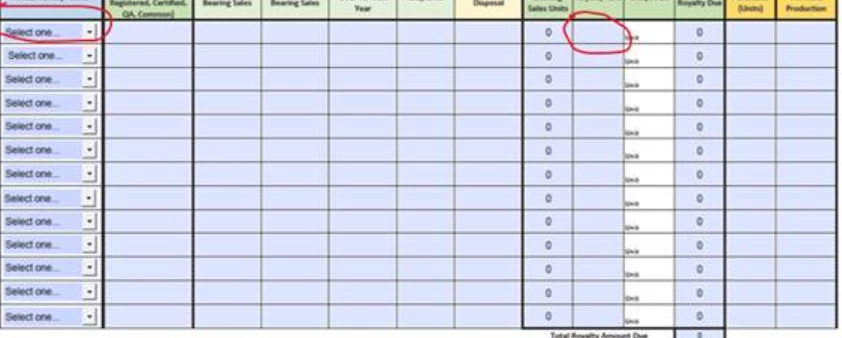
I am looking for column five from the right to auto populate based upon the selection in the drop down menu in the left-most column. Could anyone please explain the step-by-step process on how to complete this in Adobe Acrobat Pro DC?


Thank you for your help!

This topic has been closed for replies.
Correct answer Nesa Nurani

Yes, replace "myDropdownField" with "Variety Name" like this:

event.value = this.getField("Variety Name").value;

Did you add number value as export value when you were making selections in "Variety Name" field?

e.g. in "Variety Name" field add selection "John" and give it export value of 100, now when you select "John" from "Variety Name" field, "Royalty Rate" field will show 100.


1 reply

ls_rbls
Community Expert
Community Expert
November 6, 2020

What exactly are you looking to autopopulate; if the listed items in the dropdown menus have export values, are you asking to autopopulate the textfield with that export value or the face value (the face value is the string value as it appears on the dropdown menu when you pick an item from that list)?


If you don't have export values then just add this script as custom calulation script  in the text field where you want this value to show:


event.value = this.getField("myDropdownField").value;


To add this script to the text field:


  1. Open the "Prepare Form" tool
  2. Right-click on the textfield of interest, and select "Properties" from the context menu
  3. The "Text Field Properties" dialogue window will open
  4. In the Text Field Properties dialogue window select or click on the "Calculate" tab
  5. And tick the radio button to select the option "Custom Calculation Script" 
  6. See slide below:


Peyton111Author
Participant
November 13, 2020

Hi and thank you for your help @ls_rbls !


I'm still having the same problem. I will further clarify my question below. 


The column furtherst to the left, Variety Name, has multiple options from the dropdown, each of which are words and not numbers. The column fifth from the right is Royalty Rate and should autopopulate with the numeric value associated with Variety Rate.  

Do I put the Variety Name where "myDropdownField" is in the formula below? Where do I put the numeric Royalty Rate value in the formula below?

event.value = this.getField("myDropdownField").value;


Thank you for the help!

Nesa Nurani
Community Expert
Nesa NuraniCommunity ExpertCorrect answer
Community Expert
November 13, 2020

Yes, replace "myDropdownField" with "Variety Name" like this:

event.value = this.getField("Variety Name").value;

Did you add number value as export value when you were making selections in "Variety Name" field?

e.g. in "Variety Name" field add selection "John" and give it export value of 100, now when you select "John" from "Variety Name" field, "Royalty Rate" field will show 100.