
Participant
August 15, 2024
Answered

Autofill Spaces with a Check Box

  • August 15, 2024
  • 1 reply
  • 1098 views

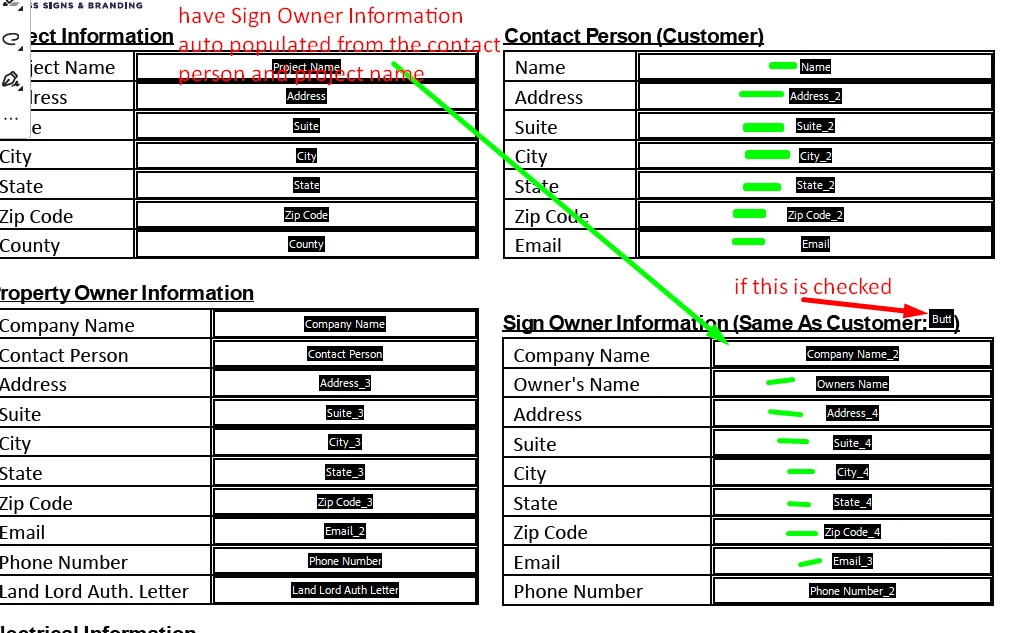
Hey All!  I cannot figure out the scripting for this to work.  If I check the box (next to same as customer) I want the fields below to insert the information from the fields that are under Contact Person and the Project Name from the project information area to automatically insert into the Sign Owner Information.  How is this done?  Any help is greatly appreciated.


This topic has been closed for replies.
Correct answer Nesa Nurani

Add this script to the Mouse UP action of checkbox:

var org = [
    "Project Name",
    "Name",
    "Address_2",
    "Suite_2",
    "City_2",
    "State_2",
    "Zip Code_2",
    "Email"
];
var copy = [
    "Company Name_2",
    "Owners Name",
    "Address_4",
    "Suite_4",
    "City_4",
    "State_4",
    "Zip Code_4",
    "Email_3"
];

for(var i=0; i<org.length; i++){
var orgX = this.getField(org[i]).valueAsString;
var copyX = this.getField(copy[i]);

copyX.value = (event.target.value == "Off") ? "":orgX;}

1 reply

Nesa Nurani
Community Expert
Nesa NuraniCommunity ExpertCorrect answer
Community Expert
August 15, 2024

Add this script to the Mouse UP action of checkbox:

var org = [
    "Project Name",
    "Name",
    "Address_2",
    "Suite_2",
    "City_2",
    "State_2",
    "Zip Code_2",
    "Email"
];
var copy = [
    "Company Name_2",
    "Owners Name",
    "Address_4",
    "Suite_4",
    "City_4",
    "State_4",
    "Zip Code_4",
    "Email_3"
];

for(var i=0; i<org.length; i++){
var orgX = this.getField(org[i]).valueAsString;
var copyX = this.getField(copy[i]);

copyX.value = (event.target.value == "Off") ? "":orgX;}
Participant
August 15, 2024

Thanks for the prompt response Nesa!  However, the script you provided didn't work...can you verify with the screen shots I took and then just uploaded and verify that I am plaacing it in the correct spot.  Thanks!

Nesa Nurani
Community Expert
Community Expert
August 15, 2024

Yes, you put the script in the right place.

In your first photo I assume you marked green fields you wish to copy, in your second image you marked other fields, but anyway in first array named 'org' goes fields you wish to copy and in second array named 'copy' goes fields where you wish to copy to, so just change field names in first array to the correct names you wish to copy from.