
Automate Headers for Multiple Documents Based on Document Name - Batch Processing Execute Javascript
Hi there
I'm hoping to automate the insertion of headers on documents through the Batch Processing/Actions > Execute Javascript function of Adobe Acrobat Pro.
The headers should have information on the left hand side and right hand side in Size 7 Arial font and pull the file name into the header.
So far I've worked out how to insert a footer with the file name through Execute JavaScript with the following script but would love some assistance to modify this so that the final result is a header that looks like the attached picture (note - right hand header should automatically pull the file name -".pdf").
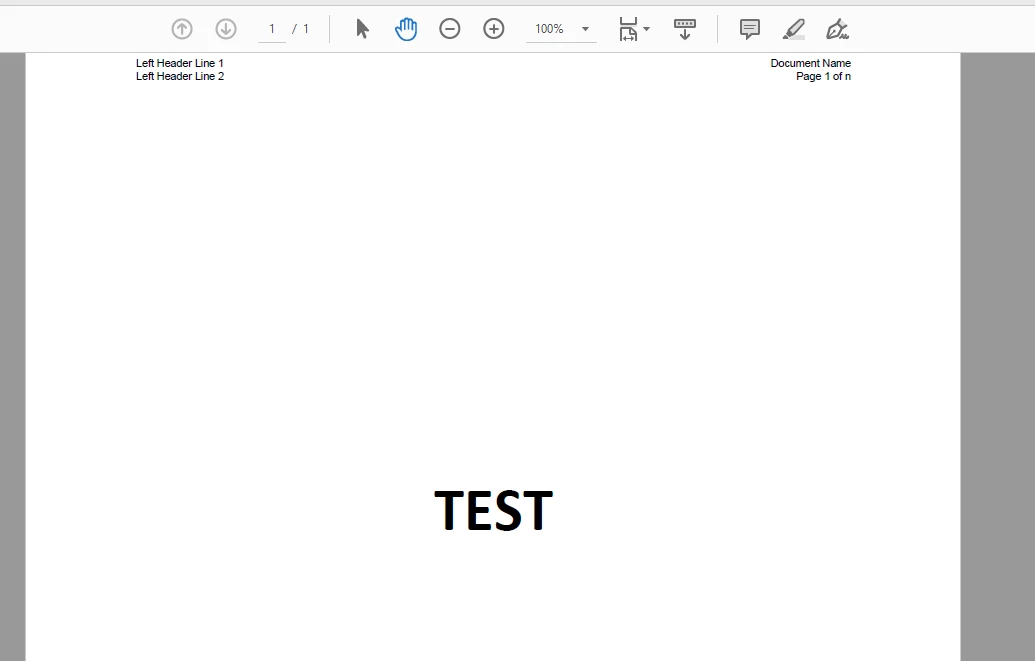
The code I've got so far that give me a footer (that pulls the filename minus ".pdf") is shown below:
var re = /.*\/|\.pdf$/ig;
var FileNM = this.path.replace(re,"");
var Path = this.path;
var Box2Width = 50
for (var p = 0; p < this.numPages; p++)
{
var aRect = this.getPageBox("Crop",p);
var TotWidth = aRect[2] - aRect[0]
var hp = this.addField("xftDate", "text", p, [30,15, TotWidth-30-30,30]);
hp.value = FileNM ;
hp.textSize=9;
hp.readonly = true;
hp.alignment="right" ;
var bStart=(TotWidth/2)-(Box2Width/2)
var bEnd=((TotWidth/2)+(Box2Width/2))
var bStart=(TotWidth-Box2Width-30); var bEnd=(TotWidth-30);
}
flattenPages();
Thank you in advance for your assistance brainstrust!
 AdChoices