
Participating Frequently
September 13, 2017
Answered

Back / Previous page buttons to PDFs that work in Acrobat Reader

  • September 13, 2017
  • 2 replies
  • 3740 views

Hi All,

Is it possible to add Back / Previous page buttons to PDFs that work in Acrobat Reader ?

I have a document with links that goes to other documents, can I get back to the exact page of the original document with one button click ?
This topic has been closed for replies.
Correct answer Dave__M

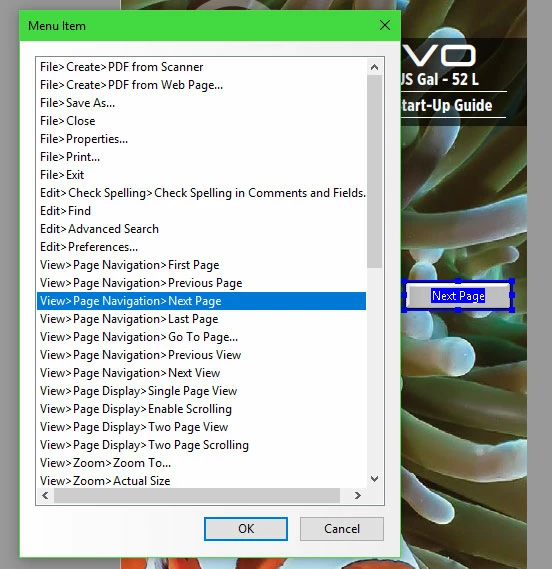
Yes, you can create a button (in Acrobat Pro) that will allow page navigation in Reader.  The button tool is part of the form toolset.  Draw your button, name it, and enter the full properties dialog box.  After setting up your physical properties, you can go to the Actions tab, and set an action of... 

Trigger:   Mouse Up

Select Action:   Execute a menu item

Select: View>Page Navigation>Next Page

I hope this is helpful.

My best,

Dave

2 replies

Dave__M
Community Expert
Dave__MCommunity ExpertCorrect answer
Community Expert
October 30, 2017

Yes, you can create a button (in Acrobat Pro) that will allow page navigation in Reader.  The button tool is part of the form toolset.  Draw your button, name it, and enter the full properties dialog box.  After setting up your physical properties, you can go to the Actions tab, and set an action of... 

Trigger:   Mouse Up

Select Action:   Execute a menu item

Select: View>Page Navigation>Next Page

I hope this is helpful.

My best,

Dave

Legend
October 30, 2017

Hi helga_nagy,

Sorry for the delay in response.

I don't understand your requirement when we already have "Show last page" and "Next page"

Also, if you have access to Acrobat using Prepare form feature, you can place buttons on every page and under properties>Actions using JavaScript you can achieve what you are looking for.

-Tariq Dar