


Participating Frequently
August 13, 2026
Pregunta

Background image artifacts or disappears.

  • August 13, 2026
  • 7 respuestas
  • 25 visualizaciones

We export formatted PDFs for clients to their design via a web interface.

All is well, PDF is the perfect format for doing this and I’ve spent a lot of time ensuring all the text and formatting is rendered in accordance with the designs given.

However… recently we have been getting reports that when you open the PDF in (latest) Adobe Acrobat Reader… The background images will render at first and then either start to artifact/wipe/disappear as you scroll.

These PDFs work practically everywhere else except the one place I’d expect them to be at their most perfect… adobe acrobat.

 

Initial load

Scroll up and down a tiny bit or highlighting text...
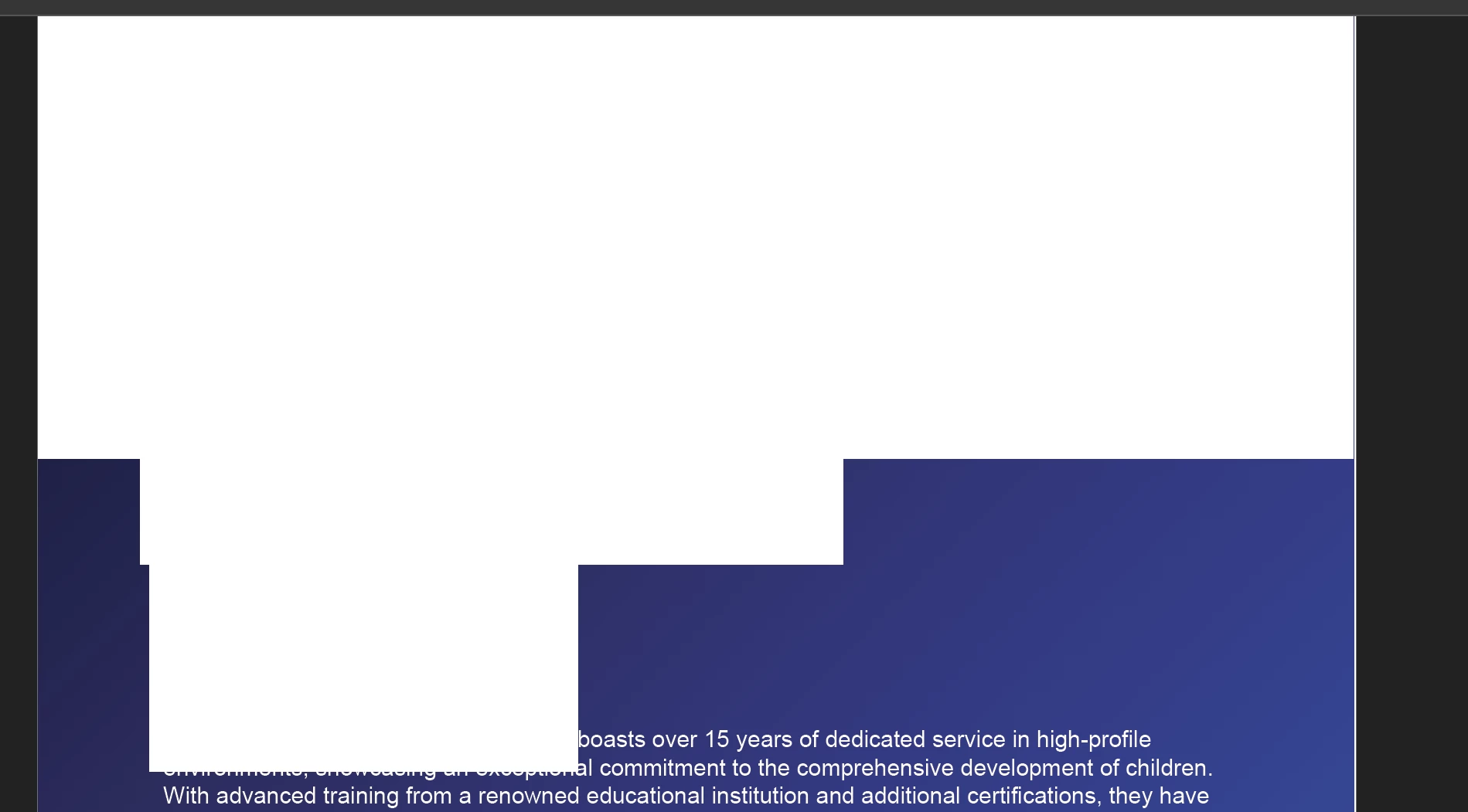
After scrolling OR highlighting text


This is a huge issue… we cannot control WHAT version a client may have OR what version of acrobat reader any person they choose to forward the PDF to has.


Again, it’s only acrobat reader.

On my computer, it will sometimes be working fine for 5 seconds, and then the issues start.

Changing the “Smoothing” options in the Pref > Display tab appears to not do anything to help.

Example PDF attached.

    7 respuestas

    Participating Frequently
    August 13, 2026

    -

    Anand Sri Bhattacharya
    Community Manager
    Community Manager
    August 13, 2026

    Hello @patrick_6800,


    I hope you are doing well, and thanks for reaching out and sharing the details. We're sorry for the trouble you had.


    Could you please share more details about the issue?

    As you mentioned, it is also happening at your end. Are you on a Mac or Windows machine, and what is the version? What is the version of Acrobat or Reader installed?

    Is it only happening with the PDFs generated by the third-party tool/plug-in? I checked the PDF properties of the attached file, and it shows as Skia/PDF m149 as a PDF producer.


    Suggestions:

    Uncheck "Use Page Cache". Go to Menu (Windows) | Acrobat (Mac) | Preferences > Page display.
    Click OK, restart Reader, reopen the file, and scroll/highlight. If the corruption stops, it is a GPU/redraw issue on that machine; updating the graphics driver resolves it. Also, confirm "Show Large Images" is on. This is only a diagnostic, though, since you rightly can't push these settings to clients.


    For the generation side:

    Downsample/optimise the background image. A single very large, high-resolution image drawn behind every page is the most common trigger for Acrobat failing to repaint it on scroll. Target around 150 ppi for screen and sane pixel dimensions.

    Flatten transparency on the background, or avoid soft masks/blend modes for it. If the background is meant to be opaque, emit it as a fully opaque image with no alpha/soft mask, so there is no compositing work on each repaint. Transparency and black-transparent alpha are a frequent source of Acrobat-only artifacts that lenient browser renderers hide.

    Use a standard colour space. Convert the background to RGB/sRGB rather than CMYK or an unusual ICC profile for screen-delivered PDFs.


    If you have Acrobat Pro installed, run your sample through Optimize PDF (downsample images) and Preflight/Flattener (flatten transparency), and reopen. If the corruption disappears, replicate those same transforms (downsample, flatten, sRGB) in your generator.


    You can also refer to these articles for more information: https://adobe.ly/4gu9QYj

    https://adobe.ly/4gsmZRI


    Let us know how it goes, and share your observations. If the issue still continues after trying these suggestions, please share the installed OS version, the Acrobat and Reader version, and the logs from the affected machine while reproducing the issue. To collect the logs, please check this article: https://adobe.ly/45YNng0


    Regards,

    Anand Sri.


    Participating Frequently
    August 13, 2026

    Thanks very much for the response.


    Windows 11 laptop with 14” screen. AMD 840m GPU.

    I shall experiment with different image resolutions and sizes whilst trying to avoid alpha channels.

    However… Is it intended that PDFs should not contain high-resolution images? Is it intended that PDFs should avoid having images which contain alpha channels? Why do the PDFs display beautifully in browser-based renderers?

    This is surely a bug with Adobe Acrobat reader, no?