Participant
Jun 7, 2018 8:54 PM UTC
Answered

Batch OCR multiple files in a folder

How can I batch OCR multiple files in a folder in Adobe Acrobat DC as used to be available in previous versions of Adobe Acrobat P     RO?

This topic is closed to new replies. Start a new post to keep the conversation going.
gary_sc
gary_scCorrect answer
Community Expert
Jun 8, 2018 10:48 PM UTC

HI sjcornelius,

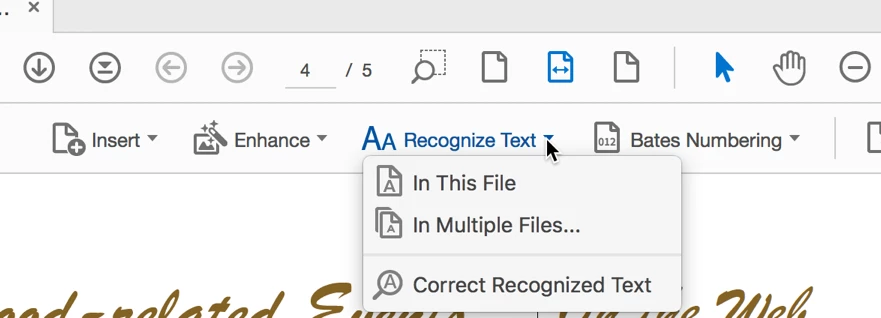
In addition to the idea that Bernd suggested you can also go to Tools -> Enhance Scans -> and go to the Recognize Text and from the DropDown if you select "Multiple Files..." you can select multiple files, multiple folders, or any open files.

Please let us know if either of these provides what you're looking for.

7 replies

Participant
Feb 22, 2024 3:57 PM UTC

Our company is switching to DC this month. Is this feature available in both DC and DC Pro? Or only DC Pro?

Translate
Participating Frequently
Oct 10, 2023 2:42 PM UTC

I wish to Batch via a wizard multiple files to stop ADOBE  auto recognize text ie if user wants to 'replace' and that not wanted by client.


Translate
gary_sc
Community Expert
gary_scCommunity ExpertCorrect answer
Community Expert
Jun 8, 2018 10:48 PM UTC

HI sjcornelius,

In addition to the idea that Bernd suggested you can also go to Tools -> Enhance Scans -> and go to the Recognize Text and from the DropDown if you select "Multiple Files..." you can select multiple files, multiple folders, or any open files.

Please let us know if either of these provides what you're looking for.

Translate
Participant
Jan 5, 2020 2:29 PM UTC

This works well for a limited number of files in a directory, but:

1. Acrobat sometimes 'chokes' on a document without any way to autocancel or manual cancel

2. Documents that already have been OCR'd are being re-OCR'd with a second pass with takes a hell of a lot of time and causes Acrobat to choke on the same document again

3. No way to flag finished documents

4. no way to make a general index for the complete directory


Translate
Participant
Mar 5, 2021 12:36 AM UTC

If you have a partially failed batch, simply sort the files by modified and moved the successly completed ones to another directory, then re-run the batch on the remaining files.  This will at least reduce the time for re-running the batch.

Translate
Bernd Alheit
Community Expert
Community Expert
Jun 8, 2018 8:47 AM UTC

You can use the Action Wizard for this.

Translate