Answered
BINDER vs PORTFOLIO
When I try to combine PDFs into a Binder, ACROBAT PRO (Mac) makes a PORTFOLIO. How could I change that?

When I try to combine PDFs into a Binder, ACROBAT PRO (Mac) makes a PORTFOLIO. How could I change that?
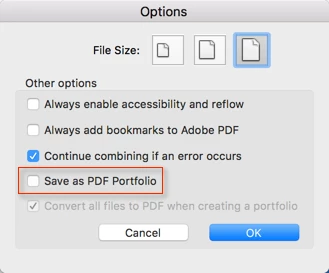
On the "Combine" dialog, there is an "Options" button. Once you press that, you can then select to create a portfolio, or (when unchecked) to combine all selected documents into a normal PDF file:
Already have an account? Login
Enter your E-mail address. We'll send you an e-mail with instructions to reset your password.
 AdChoices