


Participant
June 20, 2023
Answered

Black text showing up as white

  • June 20, 2023
  • 2 replies
  • 13150 views

I downloaded a set of slides when I used my Adobe Acrobat to open it, and the black text is showing up as white. In the screenshot below, the same file is opened with Google Chrome (left) and Adobe Acrobat (right).
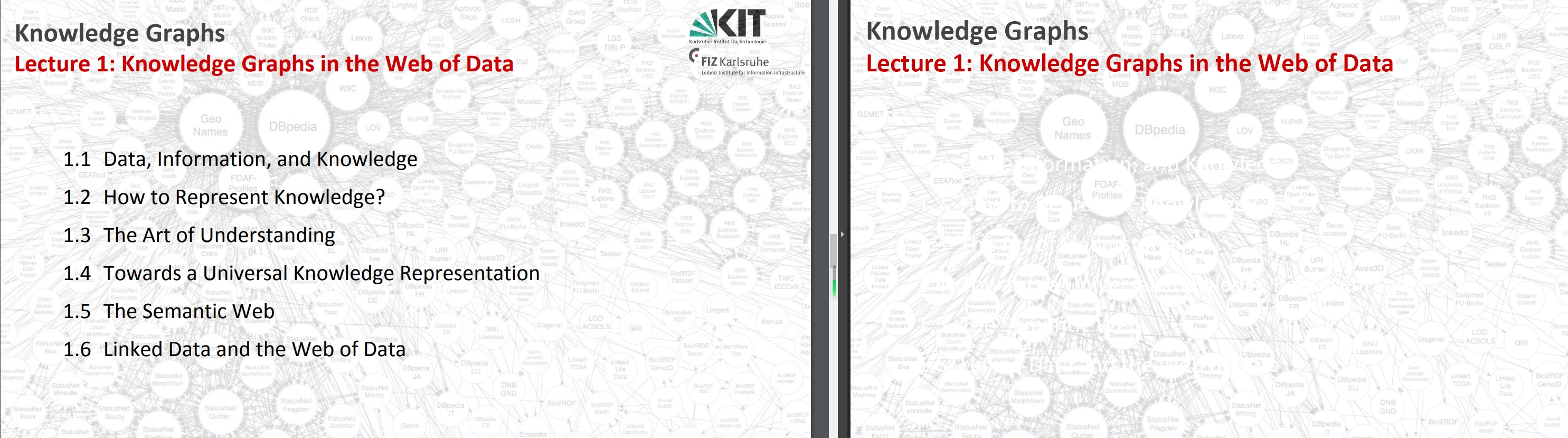
If I try to edit the text color, the text is set to black (but obviously, it is showing up as white.) If I try to set it to other colors (dark gray, green, red, etc.), the text shows up as those colors, but when I change back to black, it comes up as white again.

Does anyone have any idea how to fix this? Other pdf files are showing up correctly, just this one.

Much appreciated!

Correct answer ls_rbls

I was able to reproduce the issue with the file that you shared.


The issue, happens on my end  if the Accessibility Preferences settings are set to use "Windows Color Scheme".


Disabling this preference fixes the issue.

2 replies

ls_rbls
Community Expert
Community Expert
February 8, 2024

Hi @7834901 ,


Check if some of the Accessibility preferences is causing the issue.


See slide below:


hopeful_Aura16B7
Participant
February 9, 2024

I'll chime in here, as we have the exact same effect on a customers' machine:


Google Chrome is showing the PDF correct, Adobe Acrobat Reader ist displaying some text that should be black as white. Acrobat Reader is current (version number 23.008.20470).

I'll attach the PDF document and a screenshot showing the wrong display rendering in Acrobat.


Any advice how to fix this - or is this a bug in Reader?


Best regards,

Christian

hopeful_Aura16B7
Participant
February 9, 2024

Oh, one thing I forgot: The same file can be opened or displayed correctly on other computers - either with the same version of Acrobat Reader, or Acrobat Pro. So I doubt it is something wrong with the PDF file itself...


Christian

AkanchhaS8194121
Legend
June 30, 2023

Hi @Iceriver 


Sorry for the delay in acknowledgment.

Since it is this particular file, would it be possible for you to share the file with us?

Also, you may once check the page background settings.

Open Acrobat>Edit>Preferences>Accessibility> Document Color option.


Thanks,

Akanhhha 


February 7, 2024

Bumping this old post because I'm having the same issue and am not seeing any solution out there.

Luke Jennings3
Community Expert
Community Expert
February 7, 2024

Is your version of Acrobat up to date? (Help> Check for updates)

Is the black type a spot color?

Can you upload a sample pdf showing the issue?