
Participating Frequently
October 21, 2021
Question

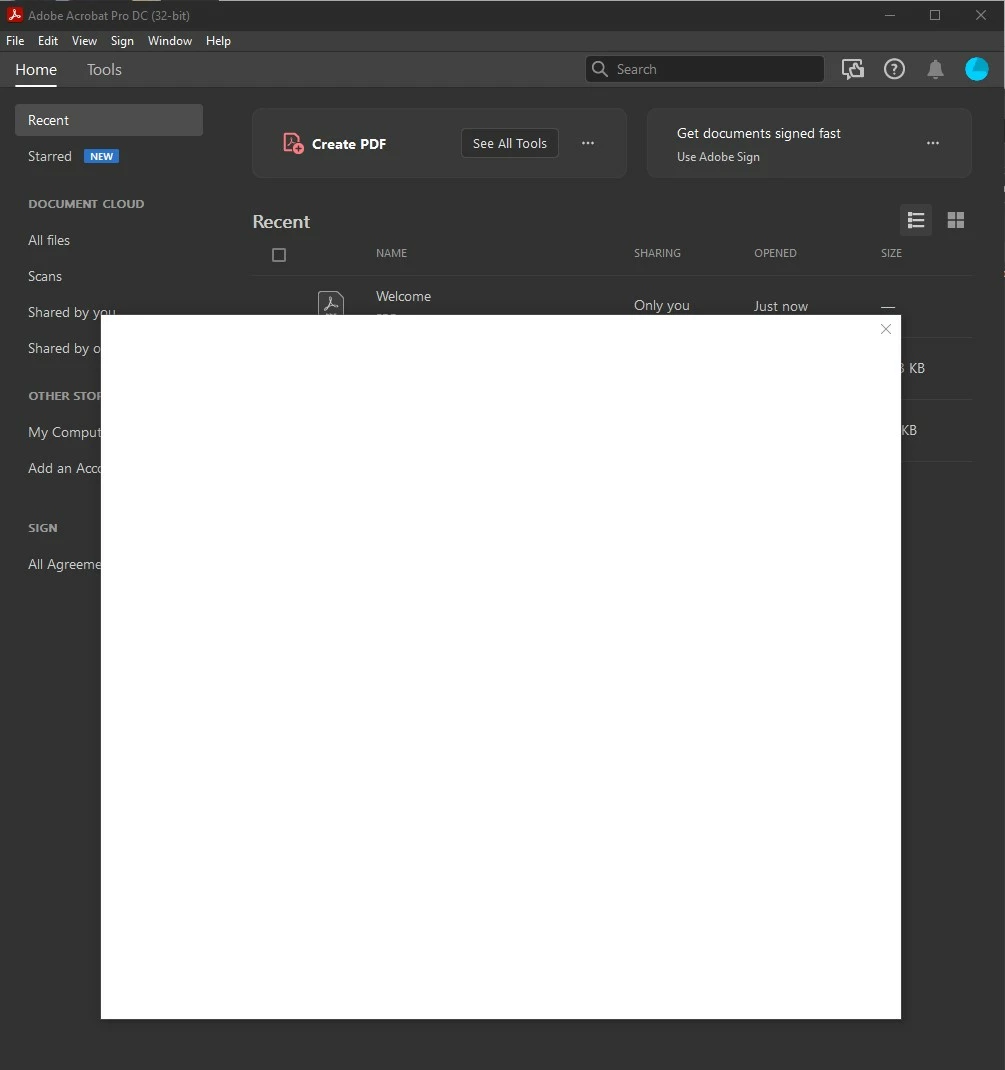
Blank Pop-up screen after launching Acrobat Pro DC

  • October 21, 2021
  • 5 replies
  • 8577 views

Does anybody have any idea what might be going wrong in Acrobat Pro DC. After I launch the program and before I can do anything, a white dialogue box appears and the cursor flashes very rapidly. Many times per second. I have reinstalled the program and the same thing is happening. See the screenshot for the visual.
This topic has been closed for replies.

5 replies

Participant
July 14, 2023

July 2023 and the problem still exists.

Opened creative cloud, logged out and in, etc. and this empty infinite loading screen still shows up in some of our installations.

Participant
July 18, 2023

Also July 2023, and I've just had the issue with Acrobat Pro (nothing else). Recently switched to Windows 11, but wasn't an initial issue, and thought it was some problem PDFs until i discoverd this thread. Uninstalled and reinstalled a couple of times before that.
Creative Cloud running in the background appears to be the cause. In Windows, even if it looks closed by clicking the 'X' in the top-right corner of the window, it may still be running in the system tray. I found I needed to quit Create Cloud (top-left corner menu in Creative Cloud, around where the File and Apps sub-menus are, then Quit Create Cloud). 
So far, so good...

Participant
January 13, 2022

https://teams.microsoft.com/l/meetup-join/19%3ameeting_ZWE4ZWRhY2EtODkzZC00MzhhLTkyZDAtN2VlNDU3MmExMjA4%40thread.v2/0?context=%7b%22Tid%22%3a%22fa7b1b5a-7b34-4387-94ae-d2c178decee1%22%2c%22Oid%22%3a%226b7c70db-bb82-4a69-ad6f-229ff35f2d4f%22%7d

quote

Does anybody have any idea what might be going wrong in Acrobat Pro DC. After I launch the program and before I can do anything, a white dialogue box appears and the cursor flashes very rapidly. Many times per second. I have reinstalled the program and the same thing is happening. See the screenshot for the visual.


By @jadato59


jadato59Author
Participating Frequently
January 14, 2022

The "problem" seems to stem from Creative Cloud not being able to log-in automatically when the computer starts up. For whatever reason, if Creative Cloud can start-up and log-in then the problem does not seem to raise its head for me. So I manually check Creative Cloud first before using an Adobe product and if it is logged in, great! no problems are likely (not had a problem so far since December with this protocol. If Creative Cloud asks me to log-in, then I log-in manually and then the day will be problem free for Adobe products (or it has been for several weeks now).

In the eraly days of problem solving I found if I deleted all the active sessions in the Account and Security tab of my account, that I was able to log in with Acrobat Pro DC and get going for the day. But very frustrating to have to do that each time you trun your computer on. I'm glad the Creative Cloud sign-in seems to fix that for me, at least.

jadato59Author
Participating Frequently
January 14, 2022

I'll just add that this morning Creative Cloud did not log me in automatically. After manually logging into Creative Cloud, I noticed that there was an update to Creative cloud applied. SO is there a problem with logging in Creative Cloud if an update is pending? Just food for thought.

Amal.
Community Manager
Community Manager
January 11, 2022

Hi there


Sorry to keep you waiting. The planned update for Adobe Acrobat/Reader DC version 21.11.20039  is now available. Please update the application from the help menu > Check for updates  and reboot the computer once.

You may also download the patch manually from the link https://www.adobe.com/devnet-docs/acrobatetk/tools/ReleaseNotesDC/index.html  and see if that works for you.


For more information about the new release please check the help page https://helpx.adobe.com/acrobat/using/whats-new.html


Let us know if you experience any trouble and need more help


Regards

Amal

Participant
January 12, 2022

We're still experiencing this after the most recent update. The exact same issue as OP.

Amal.
Community Manager
Community Manager
January 13, 2022

Hi there


We are sorry to hear that the issue is still un resolved. This is reported to our enf=gineering team and they are working on it to find the fix. We will share the update as soon as we will hear anything from them.


Thanks for your time and patience.


Regards

Amal

Participant
October 21, 2021

Having a similar issue when trying to do anything within a document and then save it...when I "save as" a white diologue box pops up and just does nothing. 

Amal.
Community Manager
Community Manager
October 22, 2021

Hi there


Hope you are doing well and sorry to hear that.  As described you get the blank pop up when saving the file.


Please go to Edit (Win), Adobe Acrobat (Mac) > Preferences > General > Uncheck 'Show online sotorage when saving file' and 'Show online storage when opening file' > Click OK and reboot the computer once. 


Regards

Amal

Amal.
Community Manager
Community Manager
October 21, 2021

Hi Jadato


Hope you are doing well and sorry for the trouble.


This issue is already reported to our engineering team and they are working on it to find the fix. We will share the update as soon as we will hear anything form them.


Regards

Amal

jadato59Author
Participating Frequently
October 22, 2021

By way of helping to solve this, I have this to report.


I thought I had it solved yesterday after deleting one of my two computers from the activated devices list (I have the allowable two devices activated). The computer I deleted from the list was the same one I was using.


Today, however, I have started Acrobat Pro DC and managed to get into a document before the pop-up screen covered the document again, but today, I have jibberish appearing in the pop-up screen. See below screenshot for details. This may prodive a clue for anybody technical.


jadato59Author
Participating Frequently
October 22, 2021

The 2nd execution of Acrobat Pro DC for the day, yesterday's behaviour has returned and the only way forward is to use task manager to kill the program.


I hope this helps.