Participating Frequently
April 6, 2017
Answered

Bolding/Highlighting Formula results

  • April 6, 2017
  • 1 reply
  • 1930 views

I've created a very lengthy order form – made in InDesign, brought into Acrobat Forms (below), I need to somehow get the total price to get bold, change color or have the form box change color when items are added to the order. I don't want it to change until the numbers other than the default '0.00' appear. Make sense? Here's one part of the form...
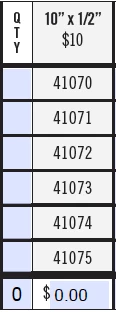
There are many of these on each page with 6 pages total so it makes things so much simpler to find orders if the color or something changes. I don't know if a similar thing can be done in Excel which could be done in a similar way in a pdf form? Any information would be greatly appreciated. I need to figure this out asap.
This topic has been closed for replies.
Correct answer try67

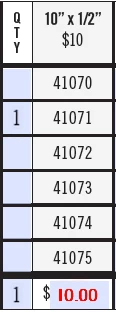
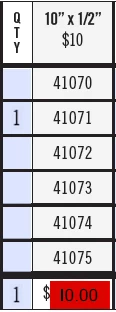
If it gets a value over 0, I just need either the text to change color, or ideally the background of the form its in to change color if possible. So if you look at my chart, if someone were to add a '1' to the quantity, at $10 each the total at the bottom will change to $10.00 – I want that $10.00 to change color or the background of that individual form.

ie:

-preferred


OK, then you can use this code as the field's custom validation script:

event.target.fillColor = (Number(event.value)>0) ? color.red : color.transparent;

1 reply

try67
Community Expert
Community Expert
April 6, 2017

Just change the Appearance properties of the field, under the Properties dialog.

heaney82Author
Participating Frequently
April 6, 2017

Yes but that keeps the appearance that way all the time, I need it to change to the color/stroke/etc. only when items in the list are chosen and the total increases. Once it goes greater than '$0.00' – that's when it changes, otherwise it stays the same color as the other boxes.

try67
Community Expert
Community Expert
April 6, 2017

So what kind of formatting settings do you want to use if the value is not 0, exactly?