

Participant
September 10, 2026
Question

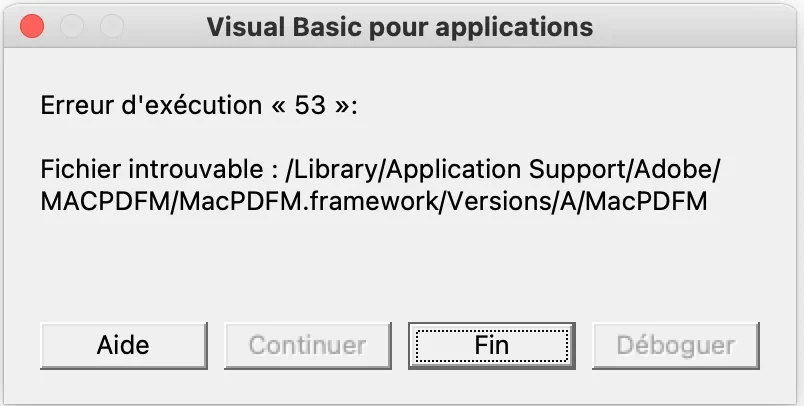
Bonjour, j'ai un soucis avec word (et microsoft en général). Quand je l'allume et que j'essaie d'ouvrir un document, une fenêtre m'indiquant "erreur d'exécution "53"" apparaît.

  • September 10, 2026
  • 1 reply
  • 12 views


    1 reply

    Anand Sri Bhattacharya
    Community Manager
    Community Manager
    September 10, 2026

    Hello @excited_fanccb0,


    I hope you are doing well, and thanks for reaching out. Sorry for the trouble you had.


    Could you please share more details about the issue? Are you trying to create a PDF file from Word? Are you on a Mac machine, and what is the OS version?


    Please note that this "Run-time error 53" (File not found) is not a bug in Word itself; it is an Adobe Acrobat add-in (the PDFMaker component, which adds the "Create PDF" button in Office) that Word tries to load at startup, but whose file is missing or damaged. Word cannot find it and therefore shows error 53. That is why it appears in Word (and in Excel/PowerPoint) rather than in Acrobat.


    The fix is to disable or remove that Adobe add-in in Office.

    In Word (works on Windows and Mac)

    • Windows: File > Options > Add-ins. At the bottom, in "Manage," choose "Templates" then "Go," and uncheck the Adobe/PDFMaker template (e.g. PDFMaker.dotm). Do the same under "Manage > COM Add-ins" and uncheck "Acrobat PDFMaker Office COM Addin."

    • Mac: Tools menu > Templates and Add-ins, and uncheck the "linkCreation.dotm" box (leave the EndNote or Zotero ones checked if present).


    If the error comes back every time you open the app (the file "reappears" checked), you need to remove the startup file Acrobat left behind:

    • On Mac: in Finder, hold the Option key and click the Go menu > Library, then go to Group Containers > https://adobe.ly/3TjU75s > User Content > Startup > Word, and move the "linkCreation.dotm" file to the Trash. (Also check the PowerPoint folder for "SaveAsAdobePDF.ppam.") Restart Word.

    • On Windows: the add-in is reached via COM Add-ins (step above); if needed, repair Acrobat from Menu > help > Repair installation, and restart the computer, or reinstall Acrobat to restore the missing component.

    • Ensure that the OS and the Microsoft Suite is full updated.


    You can also try the suggestions from the help article: https://adobe.ly/4yueKL4


    I hope this helps. Please reach out if you need any assistance or experience any issues.


    Regards,

    Anand Sri.