Participating Frequently
December 18, 2025
Answered

Bookmark pane closing when I click on any bookmarks

  • December 18, 2025
  • 2 replies
  • 126 views

Hi all,


I'm facing an unexpected behaviour with bookmark pane in acrobat. 


When I open the bookmark pane to navigate the document content, once I click on any bookmarks to reach the doument destination it will close the bookmark pane. 


Giovanni

Correct answer creative explorer

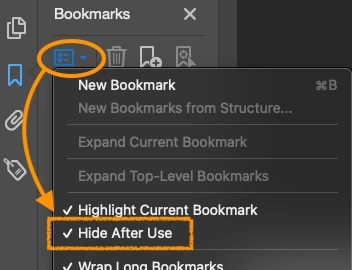
@Giovanni22846570mald there is a setting in the Bookmark options called "Hide After Use." Just open the Bookmarks pane on the left side. At the top of the Bookmarks pane, click the icon (as shown and the downward arrow). Look for the entry Hide After Use and go to uncheck it. Once unchecked, the pane should remain open even after you click various bookmarks.

creativeexplorer_0-1766109088379.png


2 replies

Participating Frequently
December 19, 2025

Thanks!!! It worked 

creative explorer
Community Expert
creative explorerCommunity ExpertCorrect answer
Community Expert
December 19, 2025

@Giovanni22846570mald there is a setting in the Bookmark options called "Hide After Use." Just open the Bookmarks pane on the left side. At the top of the Bookmarks pane, click the icon (as shown and the downward arrow). Look for the entry Hide After Use and go to uncheck it. Once unchecked, the pane should remain open even after you click various bookmarks.

creativeexplorer_0-1766109088379.png


m
January 7, 2026

Thanks! Happy 2026