Participant
August 22, 2026
Answered

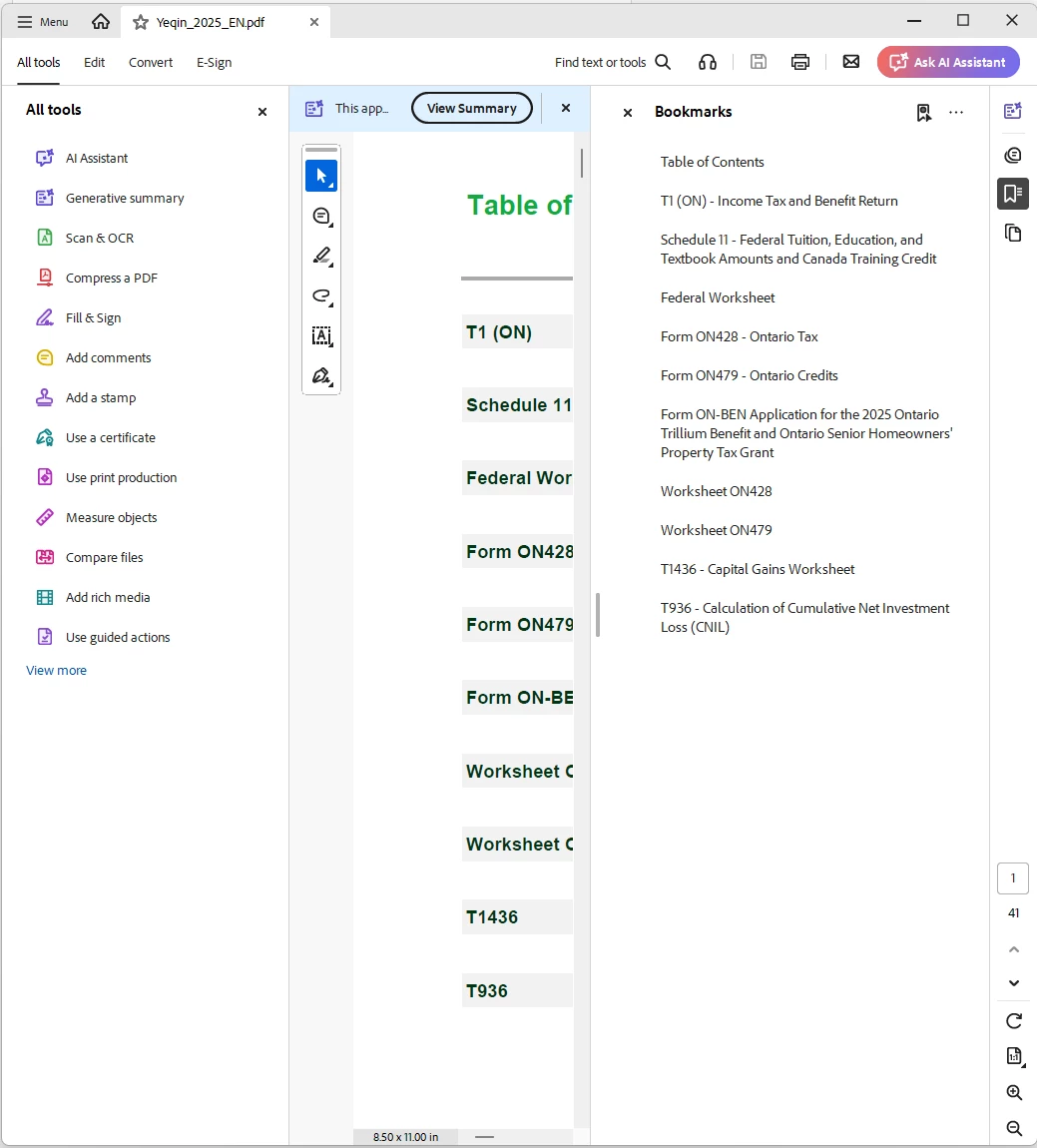
Bookmarks panel opens automatically on every PDF, no global way to turn it off

  • August 22, 2026
  • 2 replies
  • 23 views

This is how they want people to “READ” and it’s called “READER”. 

HOW DO I READ?

    Correct answer Meenakshi0101

    Hi detailed_cause3777,


    Thank you for reaching out, and sorry for the trouble caused.


    Thank you for reaching out. I understand how frustrating it can be when the Bookmarks panel automatically opens every time you open a PDF, especially if you don't use bookmarks and it takes up valuable screen space.

    Currently, Acrobat/Reader does not provide a global preference to permanently disable the Bookmarks panel for all PDFs. In many cases, the behaviour is controlled by the PDF itself. If the document author has configured the PDF's Initial View settings to open with the Bookmarks panel, those document settings will override Acrobat's view preferences.

    We also see that you are using the minimised window of the application. That is also one factor of how the PDF opens. Try setting the view settings to "Fit to width" and closing the tools pane. Or open the PDF in a maximised window.


    You may share your suggestion with the product team via the following page: https://adobe.ly/4zPbk7o


    Let us know if we can be of any help. 


    Thanks,

    Meenakshi

    2 replies

    Dave Creamer of IDEAS
    Community Expert
    Community Expert
    August 24, 2026

    The Bookmark panel shows up when it is set to, sometimes automatically by the software that creates the PDF. 

    Either click the close box to in the upper left of the panel, or if the PDF is not protected, change the initial view settings under Document Properties. 

    David Creamer: Community Expert (ACI and ACE 1995-2023)
    Meenakshi0101
    Community Manager
    Meenakshi0101Community ManagerCorrect answer
    Community Manager
    August 24, 2026

    Hi detailed_cause3777,


    Thank you for reaching out, and sorry for the trouble caused.


    Thank you for reaching out. I understand how frustrating it can be when the Bookmarks panel automatically opens every time you open a PDF, especially if you don't use bookmarks and it takes up valuable screen space.

    Currently, Acrobat/Reader does not provide a global preference to permanently disable the Bookmarks panel for all PDFs. In many cases, the behaviour is controlled by the PDF itself. If the document author has configured the PDF's Initial View settings to open with the Bookmarks panel, those document settings will override Acrobat's view preferences.

    We also see that you are using the minimised window of the application. That is also one factor of how the PDF opens. Try setting the view settings to "Fit to width" and closing the tools pane. Or open the PDF in a maximised window.


    You may share your suggestion with the product team via the following page: https://adobe.ly/4zPbk7o


    Let us know if we can be of any help. 


    Thanks,

    Meenakshi