


Known Participant
November 29, 2025
Question

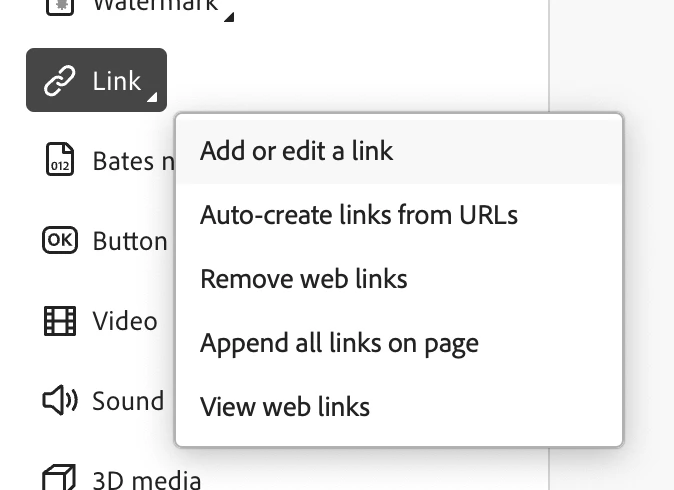
Bug: Have to click "add or edit a link" twice to add a link

  • November 29, 2025
  • 3 replies
  • 531 views

When I try to add a link in Acrobat, I have to click the same "Add or edit a link" two times for some reason. This is particularly annoying because I often have to do this task. And when Adobe "restructured" the Acrobat interface last time, I went from having to do two clicks for this task to now having to do five clicks...

Edit > More > Links > Add or edit a link > Add or edit a link


At least fix it so I don't have to click the exact same thing twice!
 

Screenshot 2025-11-29 at 1.12.02 PM.png

My next post is gonna be about how clunky Acrobat is at making a PDF "accessible". But now I have to get back to work.

3 replies

December 4, 2025

Hey! 

Ugh, I totally get you — Acrobat really overcomplicates simple things like adding a link. Those extra clicks are so annoying!

Here’s what has helped me save time:

  • Keep the Tools panel open (Edit PDF → Links) to avoid navigating menus repeatedly.

  • Keyboard shortcuts — some versions let you customize them to cut down clicks.

  • Batch tasks — create multiple links in one go rather than repeating the process.

💡 Extra Tip: For repetitive tasks like this, I actually started using a Google Stacking template to organize guides, tips, and workflow notes. It’s not Acrobat-specific, but it really helps me keep track of tricks and processes across multiple tools. You can check the template here:
https://docs.google.com/spreadsheets/d/e/2PACX-1vQYhVCEeGTVoYX4lottdK4cNHdO5_zLUe9DF7DiiG5vnEQHaksSybwh_geWSBVWwnwE63PclebI36vL/pubhtml

Honestly, it makes dealing with clunky software a little less painful. Fingers crossed Adobe streamlines the interface soon! 

ls_rbls
Community Expert
Community Expert
November 29, 2025

Hi @Peter Grecco , 


There's an easier way to do this in bulk.


What works for me is to switch back to the Classic Acrobat user interface and go to Preferences  => General => tick the checkbox "Create links from URLs"


Once you do that,  use the Edit PDF Tool and just copy any URL from your web browser and paste it as text on your document. Save the document and exit. The next time you open that document they will all be converted to clickable links automatically.


Known Participant
November 29, 2025

Thank you. I do have this setting on. But I often have to link other text that isn't a URL and it's just weird that I have to click the same thing twice.

Cheers!

Randy Hagan
Community Expert
Community Expert
November 29, 2025

This is a user-to-user forum. We have no say — and no sway — with Adobe developers.


If you'd like to report a bug to Adobe developers, you can by clicking this link for using Adobe UserVoice, then click the Acrobat hyperlink and report your issue. This will log a bug with Adobe Systems and then let them know what your problem is and hopefully get it solved.


Randy

Known Participant
November 29, 2025

Thank you. I sorta looked for that, but I was under the impression that Adobe monitors these forums.

Cheers!

Randy Hagan
Community Expert
Community Expert
November 30, 2025

Occasionally, Adobe employees will cruise through the posts. But it's not regular, except for the Announcements posts for new features and the like. There's no guarantee that they will see and respond to your post.


The good thing about UserVoice is that it puts everything on the record, gives you a record of your request, and gives you the ability to track it. UserVoice guarantees that it goes up the chain to the Acrobat product folks.


Hope this helps,


Randy