

SimonFe
Participant
February 3, 2026
Question

Bug Report - Acrobat Pro - "dead" windows displayed in Windows 11 taskbar

  • February 3, 2026
  • 1 reply
  • 22 views

Unknown if this an Acrobat Pro bug or Windows 11,  but if I hover the cursor over the acrobat pro icon on the task bar, I get a list of documents that are currently open PLUS a list of “dead” documents. 

These cannot be closed.
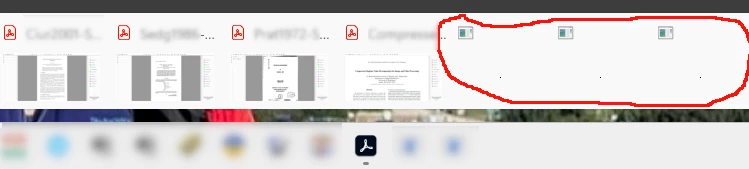
Showing “dead” document windows


If I “close all tabs” in Acrobat, only the real documents will disappear - the dead ones will continue be listed.  AFAICS it might take a restart of windows to clear these, but I may be mistaken.

    1 reply

    creative explorer
    Community Expert
    Community Expert
    February 4, 2026

    @SimonFe Not sure, but have you updated your Window 11 since that last on in January was quite buggy? Microsoft has since released a stable patch release: https://support.microsoft.com/en-us/topic/january-29-2026-kb5074105-os-builds-26200-7705-and-26100-7705-preview-85bd25de-894a-43eb-a19b-9a59d10f194b

    Are the files circle are they corrupted files less than 10kb files? Are they the temp files? On a MAC, we can have hidden files hidden… what happens if you turn on hidden files, do they disappear? https://www.windowscentral.com/software-apps/windows-11/how-to-hide-or-unhide-files-on-windows-11

    m
    SimonFe
    SimonFeAuthor
    Participant
    February 5, 2026

    Hi,
    Windows update says the system is up to date.

    I don’t know what those files/windows are.  It seems to me they are some sort of “zombie” process left over from perhaps one of

    • files that have been deleted or moved
    • files that were open at some point and maybe there was an issue when the computer was put into sleep mode etc
    • something else.

    If if close acrobat (and I have checked with Windows process explorer that it’s gone), it still displays those ’windows’ whener the cursor hovers over the task bar.

    I don’t believe they are “hidden files” - more something that had been opened in the past.
     

    creative explorer
    Community Expert
    Community Expert
    February 5, 2026

    @SimonFe either you can delete and trash them. Or move them into a folder ‘maybe trash’ just in case it’s an important OS files? If your PC still works fine after a restart, it’s probably safe to say you can delete them

    m