This topic has been closed for replies.

4 replies

JR Boulay
Community Expert
Community Expert
January 6, 2022

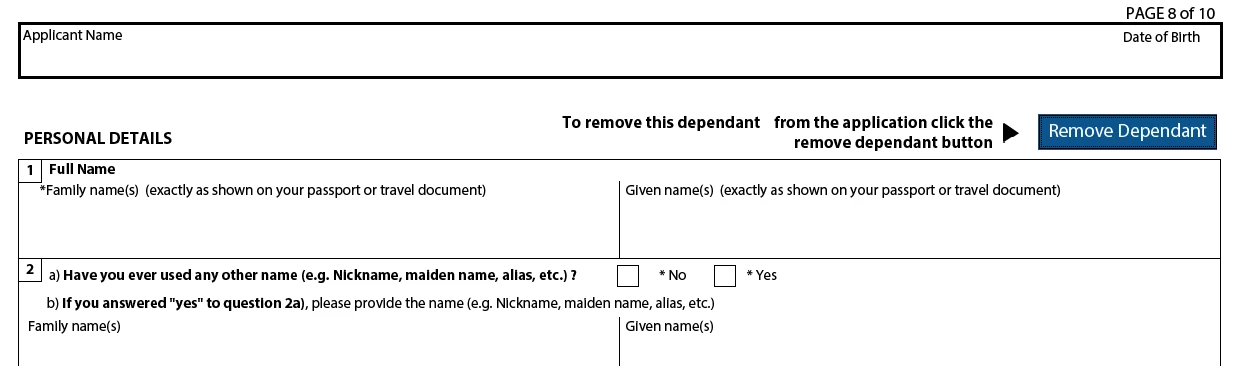
I reply about the "similar thing" since this form uses 1 dependant = 1 page.

Since this is precisely a major difference between XFA (Designer) forms and PDF (Acrobat) forms, in the latter you can only add/delete entire pages.


You can add (small) pages of a different format, it is OK on the screen but it would not change anything when printing.

Acrobate du PDF, InDesigner et Photoshopographe
JR Boulay
Community Expert
Community Expert
January 6, 2022

"Where can I find a tutorial on this topic?"

Copy-paste this URL in Google Translate:

https://www.abracadabrapdf.net/ressources-et-tutos/js-et-formulaires-ressources/dupliquer-dynamiquement-des-pages-dans-un-pdf/

Acrobate du PDF, InDesigner et Photoshopographe
Participating Frequently
January 6, 2022

It should work for me in some way. Only thing is I don't necessarily need a whole page for each dependant. 1/4-1/3 of a page would likely be good.


Adding a page for each would make the form a bit lenghy, particularly when printing out. (imagine a 10 page document with 8 pages half blank in the middle.)


Is it possible to make it shorter? Thanks.

JR Boulay
Community Expert
Community Expert
January 4, 2022

"Is it possible to make same/similar thing in Acrobat? "

Yes, using the "Pages templates" PDF feature and some JavaScript knowledge.

See: https://community.adobe.com/t5/forums/searchpage/tab/message?advanced=false&allow_punctuation=false&filter=location&location=forum-board:acrobat&q=page%20template

Acrobate du PDF, InDesigner et Photoshopographe
Bernd Alheit
Community Expert
Community Expert
January 4, 2022

This form was created with Livecycle Designer.

Participating Frequently
January 4, 2022

Thank you Bernd. Is it possible to make same/similar thing in Acrobat?