Known Participant
July 5, 2023
Answered

Button to shift results and delete oldest.

  • July 5, 2023
  • 1 reply
  • 1005 views

Good morning community,

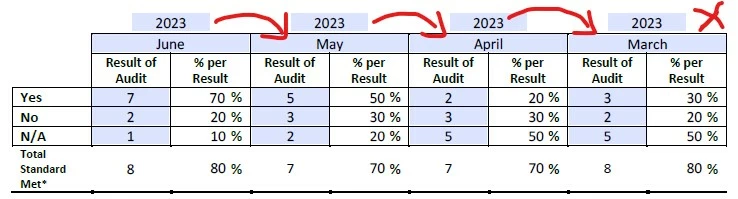
I have created a form for quality control and need some help.  The form is updated each month with results.  I am hoping there is a way to create a button that will delete the earliest month's results and shift the next three months to the right so the current month's results can be filled in on the left side.  I have current script in all the boxes to perform calculations.  I really just want the user to click a button so that all of the previous months results will automatically shift.  Is this possible?  Currently the users are having to shift the numbers manually each month.  I am no guru and a complete newby with this.


This topic has been closed for replies.
Correct answer Thom Parker

I'm using the code your provided above:


// Move all Yes fields to the right
var strPrevVal = "", strCurVal, oCurFld;
for(var i=1;i<=4;i++)
{
oCurFld = this.getField("Yes" + i);
strCurVal = oCurFld.valueAsString;
oCurFld.value = strPrevVal;
strPrevVal = strCurVal;
}

// Move all No fields to the right
var strPrevVal = "", strCurVal, oCurFld;
for(var i=1;i<=4;i++)
{
oCurFld = this.getField("No" + i);
strCurVal = oCurFld.valueAsString;
oCurFld.value = strPrevVal;
strPrevVal = strCurVal;
}

// Move all NA fields to the right
var strPrevVal = "", strCurVal, oCurFld;
for(var i=1;i<=4;i++)
{
oCurFld = this.getField("NA" + i);
strCurVal = oCurFld.valueAsString;
oCurFld.value = strPrevVal;
strPrevVal = strCurVal;
}

// Move all Year fields to the right
var strPrevVal = "", strCurVal, oCurFld;
for(var i=1;i<=4;i++)
{
oCurFld = this.getField("Year" + i);
strCurVal = oCurFld.valueAsString;
oCurFld.value = strPrevVal;
strPrevVal = strCurVal;
}

// Move all AuditPeriod fields to the right
var strPrevVal = "", strCurVal, oCurFld;
for(var i=1;i<=4;i++)
{
oCurFld = this.getField("AuditPeriod" + i);
strCurVal = oCurFld.valueAsString;
oCurFld.value = strPrevVal;
strPrevVal = strCurVal;
}



The names of the column fields in Step 2 start with the "5" index. The scripts work by looping over  the fields from 1 to 4. 

The Step 2 fields is where the consisntent naming convention breaks down.


One solution is to rename the fields so they fit the model.  Something like "Step2.Yes1",  "Step2.Yes2", etc. 

Another solution, and one that is much easier to do, is to write new loops to take the different index into account. 

I'd suggest going with the second solution and add new loops to the script:

like this:


for(var i=5;i<=8;i++)
{
oCurFld = this.getField("Yes" + i);
strCurVal = oCurFld.valueAsString;
oCurFld.value = strPrevVal;
strPrevVal = strCurVal;
}

1 reply

Thom Parker
Community Expert
Community Expert
July 5, 2023

Yes, this can be done. But a key part of the process is knowing the field names.  Ideally the fields should use a consistent naming scheme, such as "AuditTable.Row1.Col1",  "AuditTable.Row1.Col2",..  etc. The more regular the naming scheme, the easier it will be to script this kind of feature. 


Thom Parker - Software Developer at PDFScriptingUse the Acrobat JavaScript Reference early and often
Known Participant
July 5, 2023

Hi Thom,

Thank you, I do have each field with consistent a consistent naming scheme such as Yes1, No1, NA1 and Yes1%, No1%, NA1%, etc.  What I don't know is what script I would use to accomplish my goal.

Thom Parker
Community Expert
Community Expert
July 5, 2023

Excellent!  There is no "off the shelf" script. The script is hand crafted for the specific situation. 


This script will clear the first column and move everything to the right for a single field type:

// Move all Yes fields to the right
var strPrevVal = "", strCurVal, oCurFld;
for(var i=1;i<=4;i++)
{
    oCurFld = this.getField("Yes" + i);
    strCurVal = oCurFld.valueAsString;
    oCurFld.value = strPrevVal;
    strPrevVal = strCurVal;
}


For the year and month you need to set the initial previous value to the current year and month: 

// Move all Month fields to the right
var strPrevVal = util.printd("mmmm", new Date);
var strCurVal, oCurFld;
for(var i=1;i<=4;i++)
{
    oCurFld = this.getField("Month" + i);
    strCurVal = oCurFld.valueAsString;
    oCurFld.value = strPrevVal;
    strPrevVal = strCurVal;
}


Thom Parker - Software Developer at PDFScriptingUse the Acrobat JavaScript Reference early and often