Participant
March 19, 2020
Answered

Calculate a field based on radio button selection

  • March 19, 2020
  • 2 replies
  • 4047 views

Hi all,


I have a form field (“RB_Inc_9”) that I want to auto-calculate based on what radio button is selected. Please see the below screenshot for reference:
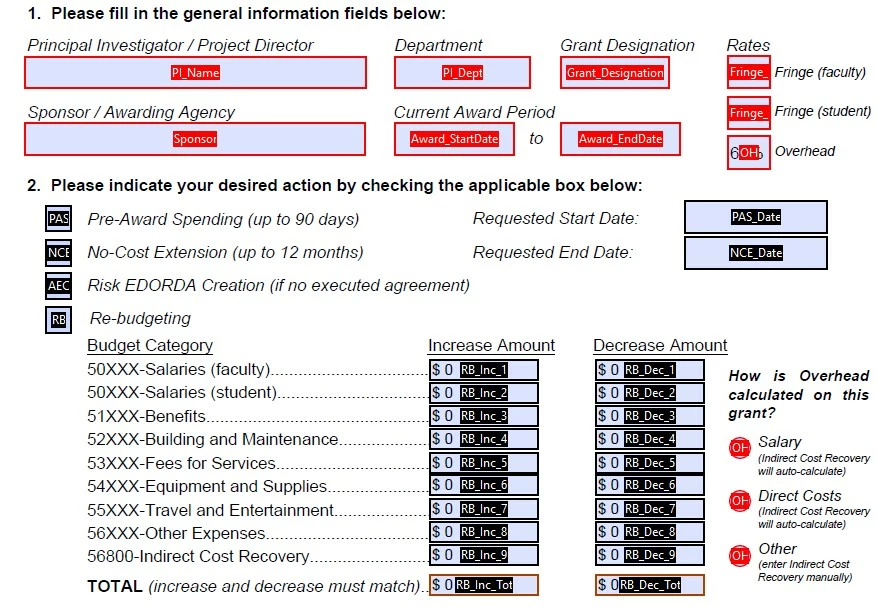
 

Here’s what I want to see:

  • If the “Salary” radio button is selected, I want the following calculation to run:
    • event.value = this.getField("OH").value * this.getField("RB_Inc_1").value + this.getField("OH").value * this.getField("RB_Inc_2").value
  • If the “Direct Costs” radio button is selected, I want the following calculation to run:
    • event.value = this.getField("OH").value * this.getField("RB_Inc_1").value + this.getField("OH").value * this.getField("RB_Inc_2").value + this.getField("OH").value * this.getField("RB_Inc_3").value + this.getField("OH").value * this.getField("RB_Inc_4").value + this.getField("OH").value * this.getField("RB_Inc_5").value + this.getField("OH").value * this.getField("RB_Inc_6").value + this.getField("OH").value * this.getField("RB_Inc_7").value + this.getField("OH").value * this.getField("RB_Inc_8").value
  • If the “Other” radio button is selected, I want no javascript calculation to run


I’ve done some research but still can’t figure out exactly how to run if/then statements in Javascipt.


Thanks!

This topic has been closed for replies.
Correct answer try67

Use this:


var overhead = this.getField("RB_Inc_9").valueAsString;
if (overhead=="Salary") {
	// insert code here
} else if (overhead=="Direct Costs") {
	// insert code here
}

2 replies

Participant
December 20, 2020

Good morning

I have a group of 3 radio buttons, I would need to select one of them to return a result in a text box.

The group is called group 1 and each button 1.1, 1.2, 1.3

Can you help me.

try67
Community Expert
Community Expert
December 20, 2020

You can use this code as the custom calculation script of your text field:


var v = this.getField("group 1").valueAsString;

event.value = (v=="Off") ? "" : v;

Participant
December 21, 2020

Thanks a lot

try67
Community Expert
try67Community ExpertCorrect answer
Community Expert
March 19, 2020

Use this:


var overhead = this.getField("RB_Inc_9").valueAsString;
if (overhead=="Salary") {
	// insert code here
} else if (overhead=="Direct Costs") {
	// insert code here
}
Participant
March 20, 2020

Hi, thanks very much for the input! I tried the code but it didn't work - see below (the IDs of the radio buttons are accurate according to my file; e.g. the Salary radio button = "OH_Sal", and the Direct Cost radio button = "OH_DC"): Let me know if you have any suggestions!


var OH_Calc = this.getField("RB_Inc_9").valueAsString;
if (OH_Calc=="OH_Sal") {
// event.value = this.getField("OH").value * this.getField("RB_Inc_1").value + this.getField("OH").value * this.getField("RB_Inc_2").value
} else if (OH_Calc=="OH_DC") {
// event.value = this.getField("OH").value * this.getField("RB_Inc_1").value + this.getField("OH").value * this.getField("RB_Inc_2").value + this.getField("OH").value * this.getField("RB_Inc_3").value + this.getField("OH").value * this.getField("RB_Inc_4").value + this.getField("OH").value * this.getField("RB_Inc_5").value + this.getField("OH").value * this.getField("RB_Inc_6").value + this.getField("OH").value * this.getField("RB_Inc_7").value + this.getField("OH").value * this.getField("RB_Inc_8").value
}

try67
Community Expert
Community Expert
March 20, 2020

Remove the "//" part... That's how you create a comment.