Participant
February 15, 2023
Question

Calculate sum for selected Group1 of choice1, choice2.........

  • February 15, 2023
  • 3 replies
  • 2147 views

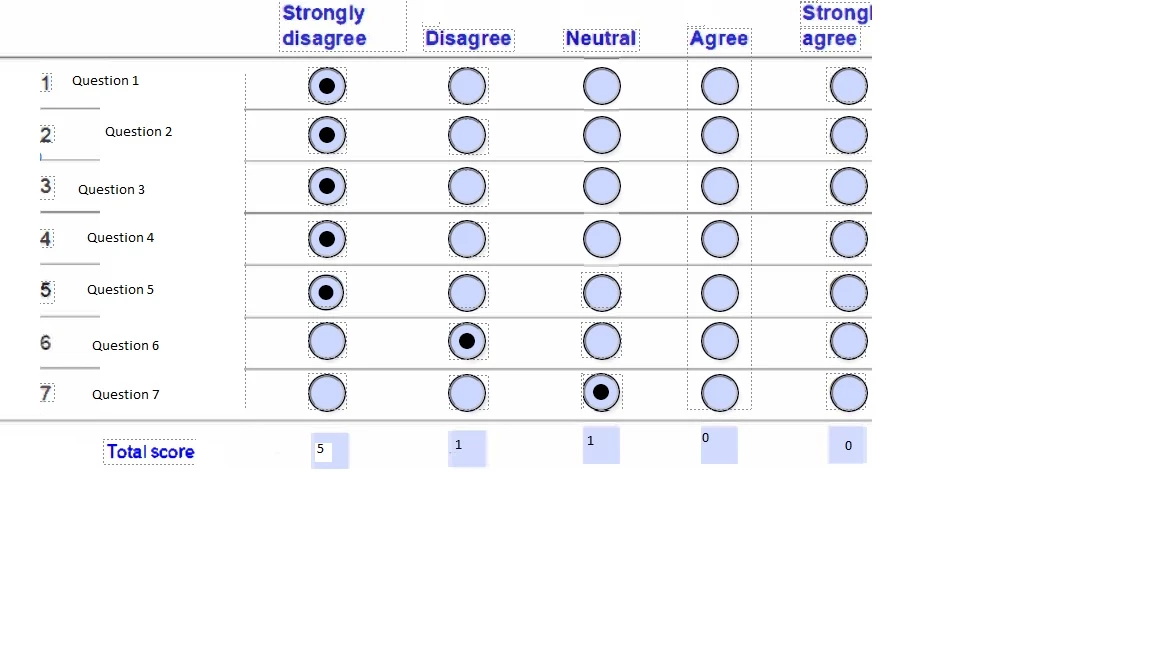
I have  7 questions.  They are radio buttons with the choice1 

Fields are set up as:

Q1 is set up as  Group1 (Choice1,  Chioce2, Choice3,Chioce4, Choice5)

Q2 is set up as Group2 (Choice1,  Chioce2, Choice3,Chioce4, Choice5)

Q3 is set up as  Group1 (Choice1,  Chioce2, Choice3,Chioce4, Choice5)

Q4 is set up as Group2 (Choice1,  Chioce2, Choice3,Chioce4, Choice5)

Q5 is set up as  Group1 (Choice1,  Chioce2, Choice3,Chioce4, Choice5)

Q6 is set up as Group2 (Choice1,  Chioce2, Choice3,Chioce4, Choice5)

Q7 is set up as  Group1 (Choice1,  Chioce2, Choice3,Chioce4, Choice5)


How to do total for each choice selected as seen in pic
 

    This topic has been closed for replies.

    3 replies

    Nesa Nurani
    Community Expert
    Community Expert
    February 15, 2023

    Don't use the same name for multiple groups.

    Rename your groups so they are named Group1-7 you can do this easily by selecting all buttons in a group, right click on one of the fields and go to properties, there you can enter a new name for the group.

    If you renamed groups as suggested and your total fields are named Total1-5 you can use this as 'custom calculation script' in one of the total fields:

    var t1=0,t2=0,t3=0,t4=0,t5=0;
    for( var i=1; i<=7; i++){
    if(this.getField("Group"+i).valueAsString == "Choice1")t1++;
    if(this.getField("Group"+i).valueAsString == "Choice2")t2++;
    if(this.getField("Group"+i).valueAsString == "Choice3")t3++;
    if(this.getField("Group"+i).valueAsString == "Choice4")t4++;
    if(this.getField("Group"+i).valueAsString == "Choice5")t5++;}
    
    this.getField("Total1").value = t1;
    this.getField("Total2").value = t2;
    this.getField("Total3").value = t3;
    this.getField("Total4").value = t4;
    this.getField("Total5").value = t5;


    kommarajuAuthor
    Participant
    February 15, 2023

    I have  7 questions.  They are radio buttons with the choice1 

    Fields are set up as:

    Q1 is set up as  Group1 (Choice1,  Chioce2, Choice3,Chioce4, Choice5)

    Q2 is set up as Group2 (Choice1,  Chioce2, Choice3,Chioce4, Choice5)

    Q3 is set up as  Group3 (Choice1,  Chioce2, Choice3,Chioce4, Choice5)

    Q4 is set up as Group4 (Choice1,  Chioce2, Choice3,Chioce4, Choice5)

    Q5 is set up as  Group5 (Choice1,  Chioce2, Choice3,Chioce4, Choice5)

    Q6 is set up as Group6 (Choice1,  Chioce2, Choice3,Chioce4, Choice5)

    Q7 is set up as  Group7 (Choice1,  Chioce2, Choice3,Chioce4, Choice5)

    Fot Totals needs to displayed in Text box -  Total1, Total2,Total3, Total4, Total5


    in Text box --> property -> Calculated --> Custom Calculated Field. I pasted your code. I am getting warning.


    try67
    Community Expert
    Community Expert
    February 15, 2023

    Remove the range option under the Validation tab of the field.

    kommarajuAuthor
    Participant
    February 15, 2023

    I am using Adobe Acrobat pro - Prepare Form.

    John T Smith
    Community Expert
    Community Expert
    February 15, 2023

    When you post a question you always need to tell the Adobe program you are using
    There are MANY programs in a full subscription, plus other non-subscription programs
    Please post the exact name of the Adobe program you use so a Moderator may move this message to that forum