
Participating Frequently
August 17, 2023
Answered

Calculated Fee

  • August 17, 2023
  • 1 reply
  • 1397 views

This is my first attempt at creating a calculated field as indepth as this but cant seem to find the specific answer. Here is what I am trying to do:

If the cell CRow(1,2,3,..) is checked take the cost of that line (CostRow1,2,3,...) X 40% and then add all those totals up in the Catering Fees Cell.


I originally used the article https://community.adobe.com/t5/acrobat-discussions/percentage-calculation-based-on-if-check-box-is-checked/td-p/12010097 as reference but couldnt get any of the variations (with my names changed) to work for my issue.
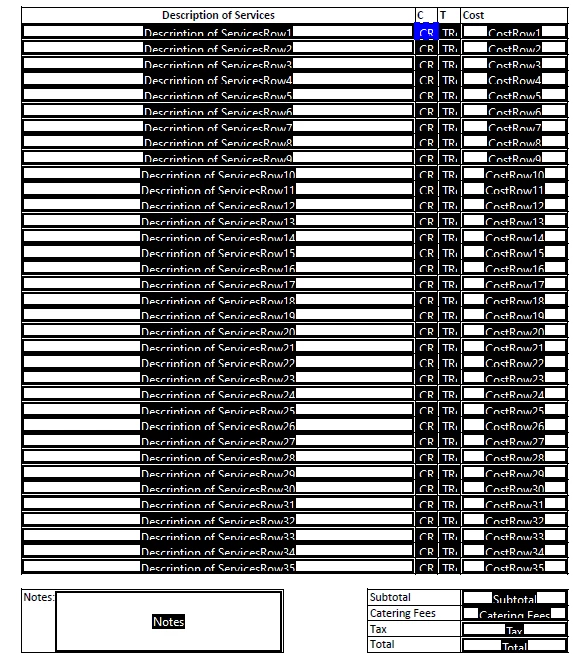
I had planned to use a check box for CRow1,2,3,etc but I can also use an X, which ever is easier. This will be going to a non tech saavy group so need it to be simple and super user friendly.

This topic has been closed for replies.
Correct answer Nesa Nurani

If I wanted the TRow field to calculate the same as the CRow and calculate at .086, where would I add the final percentage calculation?

var total = 0;
for(var i=1; i<=35; i++){
if(this.getField("TRow"+i).valueAsString === "x")
total += Number(this.getField("CostRow"+i).valueAsString);}
event.value = total;


If calculation should be CostRow*.086 then add like this:

total += Number(this.getField("CostRow"+i).valueAsString)*.086;

1 reply

Nesa Nurani
Community Expert
Community Expert
August 17, 2023

Use this in field where you want to show total as 'Custom calculation script':

var total = 0;
for(var i=1; i<=35; i++){
if(this.getField("CRow"+i).valueAsString != "Off")
total += Number(this.getField("CostRow"+i).valueAsString);}
event.value = total;
Participating Frequently
August 17, 2023

One more followup, when I put code in and select Ok, the javascript editor goes away but custom calculation script is still blank.

Nesa Nurani
Community Expert
Community Expert
August 17, 2023

Try to delete field and make new field and try put code then.

Another way to achieve it is to set cost as an checkbox export value, then just under calculate tab select 'Value is the' and pick checkboxes.

If you can't make it work share your file.