
Known Participant
July 6, 2023
Answered

Calculating Totals based on Checked Options

  • July 6, 2023
  • 4 replies
  • 2871 views

Hi,

I'm new to calculations in Acrobat, but have used them successfully in part of a document which was more straight forward.

However, part requires a calculation based on which option has been selected.

Screenshot below:
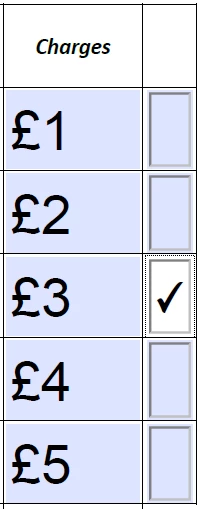
So there's 

Charge-1

Charge-2

Charge-3

Charge-4

Charge-5 

All with corresponding radio buttons, and a total field below.

Is there any way to calculate that total based on which option they've selected? (it'll only be possible to select one option).

Thanks!

This topic has been closed for replies.
Correct answer try67

Do it like this: apply the export values to the radio-buttons so they match the charge names (1-5, basically).

Then use this code for the calculation of the total (let's say the radio-button group is called "RB1"):

var rb1 = this.getField("RB1").valueAsString;
if (rb1=="Off") event.value = "";
else event.value = this.getField("Charge-"+rb1).valueAsString;

4 replies

BigRickUKAuthor
Known Participant
July 7, 2023

After all this, the calculations don't appear to work when you use the PDF as an online template!!! 

There are calculation fields in the editor - and the complicated formula doesn't work online... 

The expression is not valid because the following error occurred: [Cursor Position 5]: Unexpected field "Package"

Is this something anyone here can help with or would it be worth doing a separate thread?

Thom Parker
Community Expert
Community Expert
July 7, 2023

By "online template", do you mean that the PDF is opened by the browser?  Do you know exactly what app is displaying the PDF?  Not all PDF viewers support scripting, and of the ones that do, they usually only support a subset of the Acrobat scripting model.  It seems as though the "online" viewer being used does support some JavaScript since it reported an error. So  perhaps there is something you can do.


Thom Parker - Software Developer at PDFScriptingUse the Acrobat JavaScript Reference early and often
BigRickUKAuthor
Known Participant
July 7, 2023

No, it's uploaded to my Creative Cloud account so I can send to clients to be completed online. I've used it for 9 years, but never with calculations before. 

The editor let's you add calculations, but they don't seem to read from the PDF I uploaded, so may have to be done all over again, which is a faff I could do without... 

JR Boulay
Community Expert
Community Expert
July 7, 2023

You don't need JavaScript to do such a simple calculation.

See this demo PDF, it's a good example of what you want to do:

https://acrobat.adobe.com/link/track?uri=urn:aaid:scds:US:cdab67c2-5032-431d-b649-00aa5c5ba512


Acrobate du PDF, InDesigner et Photoshopographe
try67
Community Expert
Community Expert
July 6, 2023

Are the amount fields also editable? If so, you can set the Export Value of the check-boxes as 1 and then multiply them by the amounts, and sum it all up to get the correct result.

BigRickUKAuthor
Known Participant
July 7, 2023

Thanks @Thom Parker and @try67 - it wasn't clear what the export values were of radio buttons... 

@try67 - yes, they are editable (prefilled before sending) - I'd prefer to do it this way so I don't need to edit the buttons if the prices change, but how do you associate the radio button with the corresponding amount, as all the buttons have the same name, and all the charges fields will have prices in.

try67
Community Expert
try67Community ExpertCorrect answer
Community Expert
July 7, 2023

Do it like this: apply the export values to the radio-buttons so they match the charge names (1-5, basically).

Then use this code for the calculation of the total (let's say the radio-button group is called "RB1"):

var rb1 = this.getField("RB1").valueAsString;
if (rb1=="Off") event.value = "";
else event.value = this.getField("Charge-"+rb1).valueAsString;
Thom Parker
Community Expert
Community Expert
July 6, 2023

One way to do this is to set the export values of the radio buttons the pound value, then use the regular "Sum" calculation. 


Thom Parker - Software Developer at PDFScriptingUse the Acrobat JavaScript Reference early and often