
Participating Frequently
July 24, 2023
Question

Calculation Help - Scoring Sheet

  • July 24, 2023
  • 3 replies
  • 2988 views

JavaScript Newbie here...

I am attempting to automate the attached scoring sheet. This is a Federal form, so I cannot change the format.  I am using radio buttons for each question as only one choice can be selected. The first 3 fields have unique values assigned and that value varies based on the specific question. However, the 4th field "Did Not Occur" retains the same value as the "Good" field - either 3, 6, or 9 depending on the question. In an attempt to differenciate between the two fields, I gave the "Did Not Occur" fields values adding a .1.


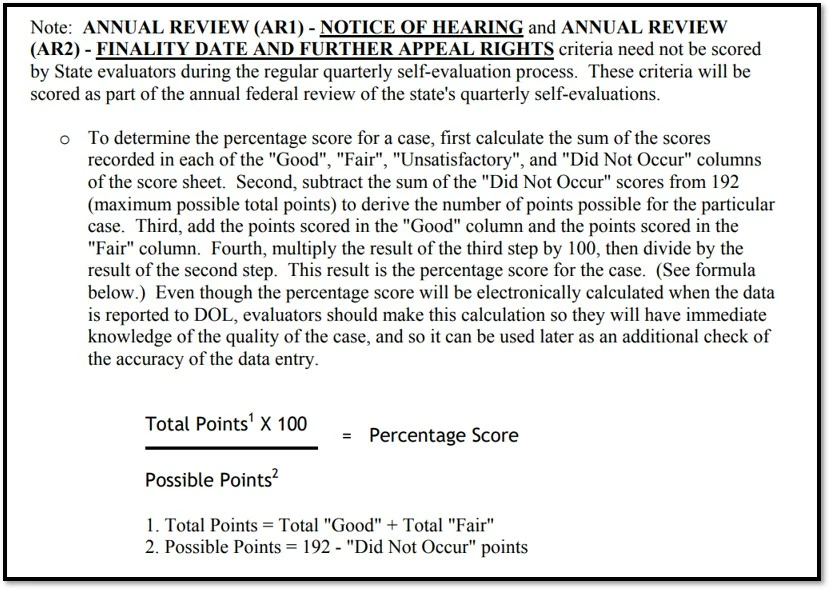
I need to total the value of  all questions with a score of "Did Not Occur" separately from the other scores, that number must be subtracted from the "Maximum Total Score" (192). I have added an "Adjusted Max Total Score" field for that number. Then, the Adjusted Max is used to calculate the "Percent Score." 

Here are the calculation instructions from the manual:
TYIA!


This topic has been closed for replies.

3 replies

Cathy208Author
Participating Frequently
July 25, 2023

Here's the script that I came up with, but I am not getting any results. I've been combing through the community questions for 3 days now, I just have so many questions. Can I format my "Did Not Occur" answers differently? Could someone help me troubleshoot?

 
var total = 0;
var n = 0;
for (var i=1; i<=31; i++) 
{
if (this.getField("Score"+1).value == 3.1)
{ event.value = 3;}
else if (this.getField("Score"+1).value == 6.1)
{ event.value = 6;}
else if (this.getField("Score"+1).value == 9.1)
{ event.value = 9;}
else 
{ event.value = nSum;}}


Thom Parker
Community Expert
Community Expert
July 25, 2023

Excellent Try!! You're script is close, but needs some fixes in order to operate.  For example, variables named "Total" and "n" are declared, but never used. A variable named "nSum" is used, but never declared. And the loop isn't doing anything because the same field is being aquired everytime around the loop.  But you've managed to put together a reasonal structure. 


Here's an update:

var total = 0, nScore;

for (var i=1; i<=31; i++) 
{
   nScore = this.getField("Score"+i).value
   if (nScore  == 3.1)
     total  += 3;
   else if (nScore  == 6.1)
     total  += 6;
   else if (nScore  == 9.1)
     total  += 9;
}
event.value = total;


Your first post implies the "3.1", "6.1", and "9.1" are export values from a radio button group. Is this true? if it is, then the the comparison is incorrect.  You're not comparing to a number, but to a string. However, it should  still work since JavaScript does automatic conversions. 


Thom Parker - Software Developer at PDFScriptingUse the Acrobat JavaScript Reference early and often
Cathy208Author
Participating Frequently
July 26, 2023

Thanks Thom - Since the Select radio button already has score values (for example) 6, 3, 0 - I was trying to make a distinction between a score of 6 when the question's answer was "Did Not Occur." Originally I tried to give it a valuse of 6D, but the letter would not show in the "Score" text box. I did not know if the program would make a distrinction between a "Good" value 6 and a "Did Not Occur" value 6 (the latter is subtracted from the total number of possible points - which impacts the score percent.) So I felt using 6.1 as a distinction would be enough to differenciate, but with rounding would not impact the %. 

Thanks for your help Thom, I learned a lot from those articles that many other articles I have read assume a user already knows, such as the meaning of == and &&.


maxwithdax
Community Expert
Community Expert
July 24, 2023

If this is a federal form remember that whatever you implement must also comply with Section 508 Accessibility Requirements. 


Cathy208Author
Participating Frequently
July 24, 2023

This is for internal use only. The final scoring is submitted through the Federal Sun system using the totals. I am just trying to make the process easier and (hopefully) eliminate human error with manual calculations.

Thom Parker
Community Expert
Community Expert
July 24, 2023
Thom Parker - Software Developer at PDFScriptingUse the Acrobat JavaScript Reference early and often
Cathy208Author
Participating Frequently
July 24, 2023

Thanks