
Participant
June 21, 2017
Answered

Calculations Tab not showing up

  • June 21, 2017
  • 2 replies
  • 7062 views

I'm new to creating forms and I'm not getting a calculations tab in the text field properties. The tabs that I get are General, Appearance, Position and Options. I've also read that it only works for text fields and drop down boxes I've created both and still no calculations tab.

I'm using the latest Adobe Acrobat Pro DC for Windows

Thanks
This topic has been closed for replies.
Correct answer Bernd Alheit

It's not available on mine. 


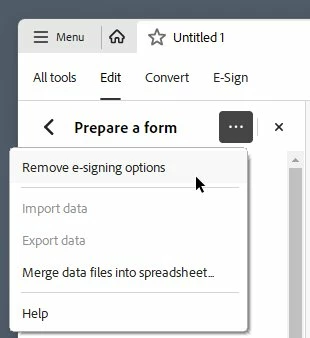
Use the menu at the ...

2 replies

Bernd Alheit
Community Expert
Community Expert
June 21, 2017

Convert the eSign form to a Acrobat form.

Participant
February 8, 2024

How do you do this in 2024? There is not option to convert to Acrobat Form

Participant
February 12, 2024

Having the same issue

try67
Community Expert
Community Expert
June 21, 2017

Click on Tools - Prepare Form and then click on "More" at the right side of the window and then on "Revert to Acrobat Form".

Participant
June 21, 2017

Thank you. Got it to work.