
Participant
October 23, 2024
Question

calendar dates auto populate

  • October 23, 2024
  • 2 replies
  • 627 views

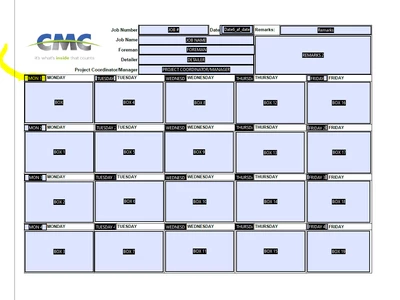
I have a fillable pdf for our foreman to turn in their 4 week schedules on, I want them to be able to enter 1 date and than the rest of the days to auto populate. I have it formatted in excel, but cannot figure out how to do it in ACROBAT. 

I want the yellow highlighted MON to be a date they enter than the dates to follow 1 week at a time NO SAT or SUN dates 


This topic has been closed for replies.

2 replies

try67
Community Expert
Community Expert
October 24, 2024

You can use something like this as the custom Validation script of the field:


if (event.value) {
	var d = util.scand("mm/dd/yyyy", event.value);
	d.setDate(d.getDate()+1);
	this.getField("TUE").value = util.printd("mm/dd/yyyy", d);
	d.setDate(d.getDate()+2);
	this.getField("WED").value = util.printd("mm/dd/yyyy", d);
	// etc.
} else {
	this.getField("TUE").value = "";
	this.getField("WED").value = "";
	// etc.
}


The script can be improved using a for-loop, but for that I would need to know the names of the fields, and I can't make them out from your screenshot.

Participant
October 24, 2024
IF THEY CAN ENTER THE DATE ON MON1 FIELD THEN THE REST POULATE FOR THE WEEK AND THE 3 TO FOLLOW THAT WOULD BE GREAT
 
 
MON1  TUESDAY      WEDNESDAY     THURSDAY     FRIDAY
MON2  TUESDAY2     WEDNESDAY2   THURSDAY2    FRIDAY2
MON3  TUESDAY3     WEDNESDAY3   THURSDAY3    FRIDAY3
MON4  TUESDAY4     WEDNESDAY4   THURSDAY4    FRIDAY4


PDF Automation Station
Community Expert
Community Expert
October 24, 2024

Your made it lot more complicated with your field naming inconsistency.  However, enter the following custom validation script in MON1:

if (event.value) 
{
var d = util.scand("mm/dd/yyyy", event.value);
d.setDate(d.getDate()+1);
this.getField("TUESDAY").value = util.printd("mm/dd/yyyy", d);
}

And enter the following custom validation script in TUESDAY:

var days=["","","MON","TUESDAY","WEDNESDAY","THURSDAY","FRIDAY"];
var day=4;
var row=2;

if(event.value)
{
for(var i=1;i<4;i++)
{
var d = util.scand("mm/dd/yyyy", event.value);
d.setDate(d.getDate()+i);
this.getField(days[day]).value=util.printd("mm/dd/yyyy", d);
day++;
}

d.setDate(d.getDate()+3);
day=2;
var adv=1;
for(i=1;i<16;i++)
{
this.getField(days[day]+row).value=util.printd("mm/dd/yyyy", d);
if(i%5==0){adv=3;row=row+1}else{adv=1}
d.setDate(d.getDate()+adv);
day++;if(day==7){day=2}
}
}
PDF Automation Station
Community Expert
Community Expert
October 23, 2024

Add a validation script to that field that populates the rest of the fields, based on the date plus 1 day (or 3 days from Fri to Mon).

Participant
October 24, 2024

Nothing I am doing is working


PDF Automation Station
Community Expert
Community Expert
October 26, 2024

Did you try the scripts I provided in my answer below?