
Can I create a form that adds lines whenever a button is pressed?
Our group has some old forms. They are adjustable. We can add and remove lines with the +/- buttons, like so:
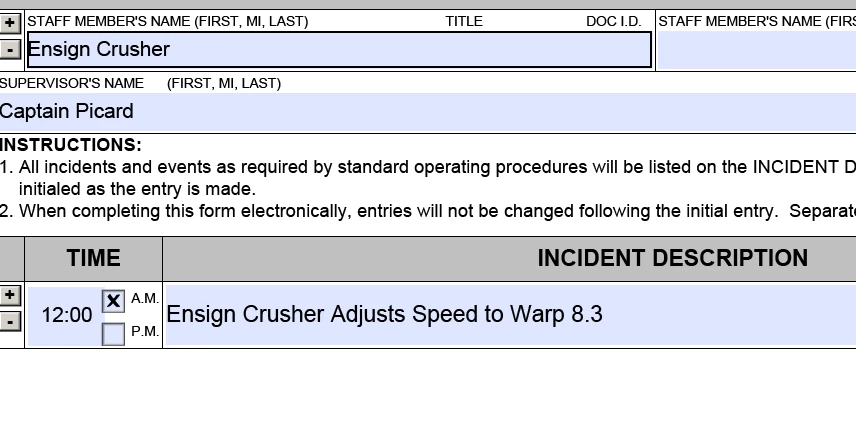
This form might be adjusted to:
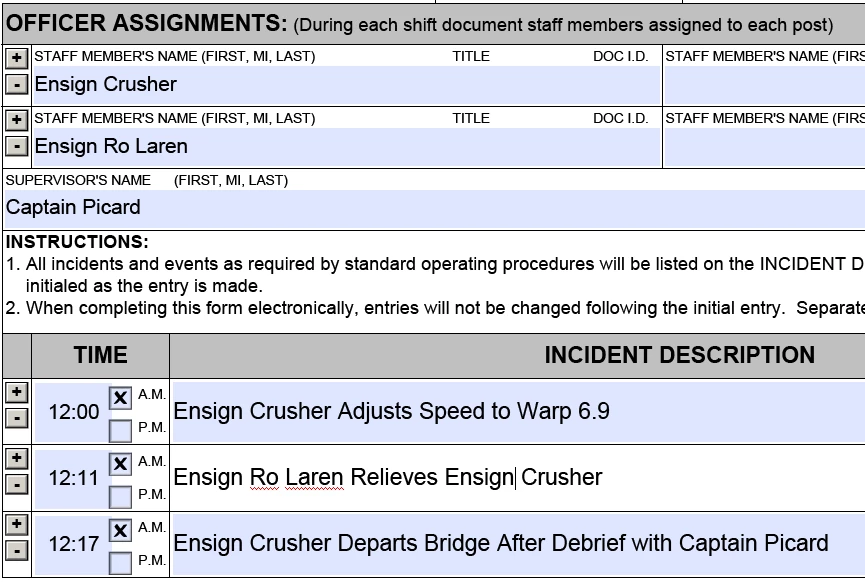
simply by pressing the "+"button a couple of times.
However, Adobe tells me it can't edit anything created in "LiveCycle Designer." We need some additional, but different forms with this property.
I have a few hundred hours of programming experience, so I can probably just draw lines and move text elements around the screen in javascript, but I was wondering if a more straightforward solution exists in Adobe Acrobat Pro.
(If not, my only javasript experience is in the browser, so I'd be grateful for a few adobe-specific pointers.)
Things like "Remote Segmentation" and "Glacial Bureaucracy" strongly describe our orginization, so our access to any more advanced tools is limited - nobody even knows who to ask internally. We'll have to do it with Adobe Acrobat, if we do it at all.


 AdChoices