
alexisj52864141
Participant
September 26, 2018
Answered

Can I delete comments I made while editing?

  • September 26, 2018
  • 1 reply
  • 4143 views

I am using Acrobat Pro DC to edit PDF text files.  When I mark through a word, or highlight it, or however I edit the text, I then use the comment boxes.  However is there a way to delete a comment (comment box) after it's 'posted'?

My comments will show up on the right side of the file, in order of how I edited the text, but there are some that I realize do not need a comment - I need to delete those comments.

Any help is appreciated - thanks!!

AlexisJ
This topic has been closed for replies.
Correct answer Adorobat

Hi AlexisJ,

As per the issue description mentioned above, you want to delete the comment box added while commenting on the pdf using Acrobat, is that correct?

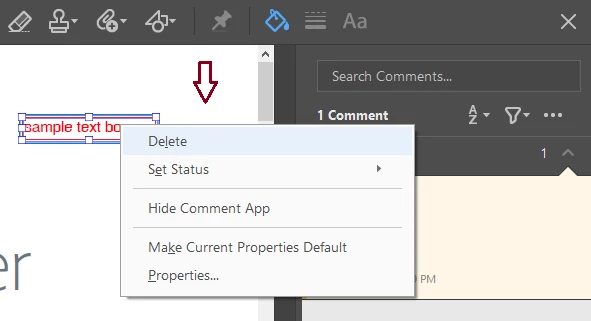
To delete a comment box, select the comment box > right-click > delete. you can also select the comment in the right-hand bar > right-click > delete. (below is a screenshot).

You may also refer to the following help document for the same:

Use annotation and drawing markup tools to add comments in PDFs, Adobe Acrobat and Acrobat Reader

Let us know if you have a further query.

Shivam

1 reply

Adorobat
AdorobatCorrect answer
Participating Frequently
September 27, 2018

Hi AlexisJ,

As per the issue description mentioned above, you want to delete the comment box added while commenting on the pdf using Acrobat, is that correct?

To delete a comment box, select the comment box > right-click > delete. you can also select the comment in the right-hand bar > right-click > delete. (below is a screenshot).

You may also refer to the following help document for the same:

Use annotation and drawing markup tools to add comments in PDFs, Adobe Acrobat and Acrobat Reader

Let us know if you have a further query.

Shivam

alexisj52864141
Participant
September 28, 2018

Shivam

Thank you so much - certainly was more simple than I thought!   Have a great weekend.