
danm22902856
Known Participant
February 28, 2019
Answered

Can I remove black overprint in pdf?

  • February 28, 2019
  • 1 reply
  • 9998 views

Is there a way to remove black overprints so they knockout? Files are supplied pdfs. Black is set to overprint.

I do not want to use the workaround of placing in illustrator, flattening, etc. It will take far too much time.
This topic has been closed for replies.
Correct answer Stephen Marsh

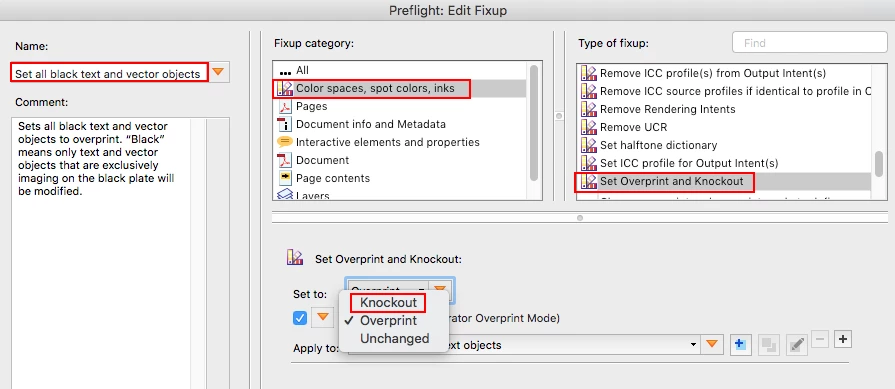
Sure, using the print production tools > preflight > single fixup, duplicate the standard “Set all black text and vector objects to Overprint” fixup, rename it and change it to use knockout:

P.S. 3rd party tools such as Enfocus PitStop Pro also excel at such edits, whether performed manually, via an action list or automated from a hot folder in PitStop Server.

1 reply

Stephen Marsh
Community Expert
Stephen MarshCommunity ExpertCorrect answer
Community Expert
March 1, 2019

Sure, using the print production tools > preflight > single fixup, duplicate the standard “Set all black text and vector objects to Overprint” fixup, rename it and change it to use knockout:

P.S. 3rd party tools such as Enfocus PitStop Pro also excel at such edits, whether performed manually, via an action list or automated from a hot folder in PitStop Server.

danm22902856
Known Participant
March 1, 2019

Thanks very much. Is there a way to set it for all objects. Not just the black?

Stephen Marsh
Community Expert
Community Expert
March 2, 2019

There is a standard fixup called "Set Overprint Mode for all text and vector objects to 1” which you can duplicate and change to remove overprints. I have not made exhaustive tests, so there may be some objects that are not affected: