
Participant
October 10, 2019
Question

Can't convert a PDF into a Word doc using Acrobat X on Windows 10 PC

  • October 10, 2019
  • 2 replies
  • 631 views

When trying to convert a PDF into a Word doc, either docx or older version, I continually get the message as follows: The procedure entry point ?GetTextDirection@CSolidContainer@@QBE?AW4SolidTextDirection@@XZ could not be located in the dynamic link library C:\Program Files (x86(\Adobe\Acrobat 10.0\Acrobat\plug-ins\SafeAsNonPDF\Solid\DOCXFlt.flt.
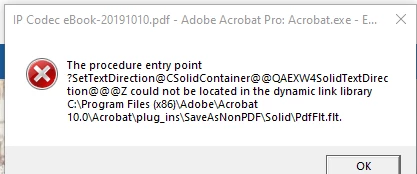
 

Does anyone have any hints or tips to fix this? I have tried to reinstall/fix errors and it doesn't seem to fix the issue. It's incredibly frustrating. Any assistance would be greatly appreciated.


regards,


Glenn

    This topic has been closed for replies.

    2 replies

    mwbrave14
    Participant
    March 4, 2023

    Hello, I have encountered this exact same problem. The Adobe Acrobat 10 Pro is pre installed in my laptop and I don't have the license number so reinstalling is out of question. Luckily I have stumbled upon the repair by chance. This solution is for you guys who also has the same problem. In my error it has been stated that there are three files that are problematic: DOCXFlt.flt, PdfFlt.flt, and RtfFlt.flt. So I go to the aforementioned folder which is C:\Program Files (x86)\Adobe\Acrobat 10.0\Acrobat\plug-ins\SafeAsNonPDF\Solid\ and moved those three files out of the folder (want to delete it at first but decided to only moved it just in case). Then I go to Control Panel --> Program and Features --> Adobe Acrobat X Pro, and clicking "Change" instead of uninstall, then I perform the "Repair" option in the Setup Wizard. After it finished, I tried converting my PDF again to Docx and it worked again just like before. I hope this fix is permanent so I don't have to repeat the process again.

    Legend
    October 10, 2019

    Try running Acrobat X in a supported operating system, or use a supported version of Acrobat in Windows 10. The current version,DC,  is available by subscription including future updates.

    Glenn189Author
    Participant
    October 16, 2019
    Thank you, I didn't realise Acrobat X wasn't supported and that would cause this sort of issue.