Participant
January 27, 2021
Question

Can't Create Digital ID

  • January 27, 2021
  • 1 reply
  • 4342 views

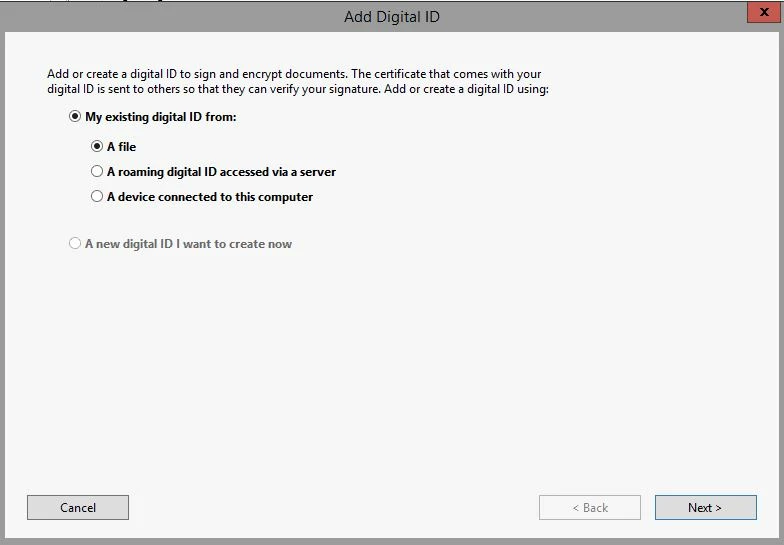
I have been trying to create a digital ID in Acrobat DC Pro. All the instructions, FAQ's, and other internet I have managed to find say that when I'm in the "Add Digital ID" dialog box, I need to click the radio button beside "A new digital ID I want to create now". However, this option is grayed out (not selectable) and the options under "My existing digital ID from:" are the only ones I can select/deselect (see below). Has anyone else had this problem and/or know how to fix it?
This topic has been closed for replies.

1 reply

AkanchhaS8194121
Legend
January 28, 2021

Hey!


Thanks for the screenshot.

Is this a personal computer or managed by your office IT team? By default this add a new digital ID option should be selectable. 

Lets try an alternate method.

  1. Open any PDF for testing>Tools>Certificate
  2. Select Digitally Sign from menu-bar
  3. Drag to draw a rectangle box
  4. On the new dialog box select>Configure New Digital Id>Continue


Did it help?


Thanks,

Akanchha 

Participant
January 29, 2021

Thanks for the reply. The steps for the "alternate method" wind up in the same place as the screenshot. I am using an IT managed computer and now that you've mentioned that, it seems possible that the issue could be due to a setting they have somehow locked or changed from default. I will update the thread if useful information comes to light.

Participant
January 26, 2023

Hello! Have you solved the probelm?