
Participant
May 27, 2020 10:46 AM UTC
Question

Can't Figure Out How to Change Font in Form Fields

Hello, 

I may be a blooming fool here, but here goes...

A friend gave me a copy of an editable contact list. Perfect! There are fillable fields for name, address, etc.

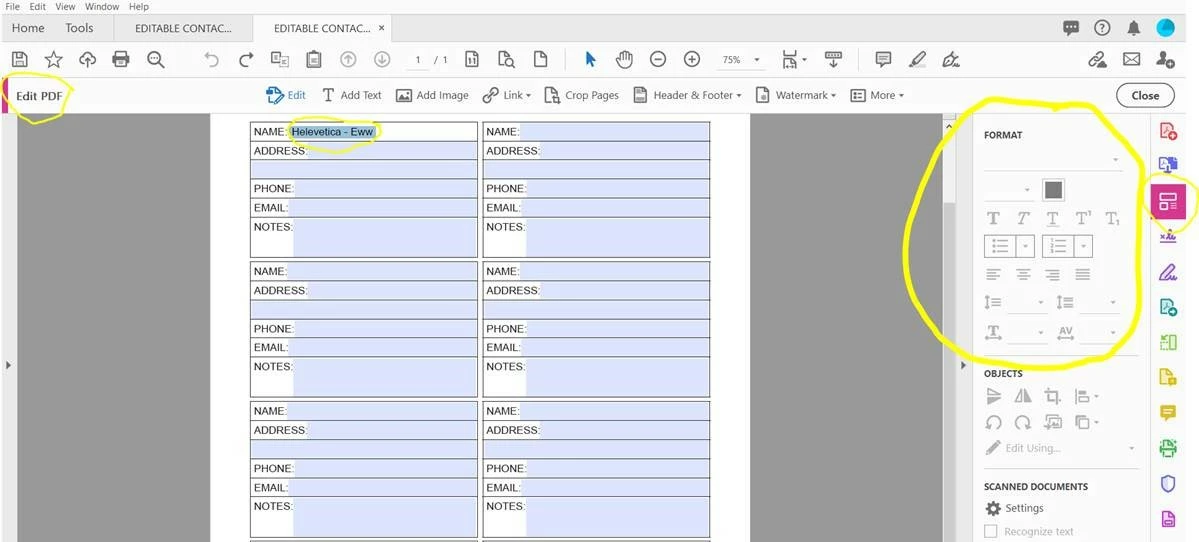
I can't stand Helevetica font. So, I wrote the name, highlighted, right-clicked, and there's really no option to change font type - just options for bold, italic, etc. I tried clicking "Edit PDF" as well. When I click "Edit PDF" and fill out the field, the text formatting option remains grayed out, even if I highlight the text.

I tried editing through "Prepare Form." I wrote text in the field, then right-clicked on the field to view properties. I can change the font type from there, but it doesn't change the text I've already written. I have to go back and change the font type in the form field before my text appears with the correct font.


How can I change the font type/size of text within a form field? Is it impossible to apply changes in font to text already written in the field, or am I a dunce?


How can I apply the font type/size changes to the entire document, and not just one field?


Is there anyway the contact information can be edited through the Edit PDF function?
 

This topic is closed to new replies. Start a new post to keep the conversation going.

12 replies

Legend
Aug 11, 2021 2:32 PM UTC

It's pretty confusing; there are many kinds of things in a PDF, each needing a different editor.

Page contents - use Edit

Form fields - use Prepare form

Comments/annotations - use Comments

Translate
try67
Community Expert
Community Expert
May 27, 2020 3:08 PM UTC

Go to Tools - Prepare Form, then right-click the field, select Properties, Appearance and you'll be able to change it there.

Translate
Participant
Aug 11, 2021 1:41 PM UTC

Hello, I'm having a similar issue on a fillable form I've created, but when I'm in the form and I right click and slect Properties nothing happens. I was able to do this yesterday when I first started making the form, but I saved and closed it to continue working today, and now I can't view the properties (I'm want to center the text within the field).


Any assistance would be awesome!

Translate
try67
Community Expert
Community Expert
Aug 11, 2021 2:24 PM UTC

Are you in Prepare Form mode? What's your version of Acrobat, and OS version?

Translate
Bernd Alheit
Community Expert
Community Expert
May 27, 2020 11:03 AM UTC

Why does you use Edit PDF when you fill form fields?

Translate