
Participant
September 11, 2024
Question

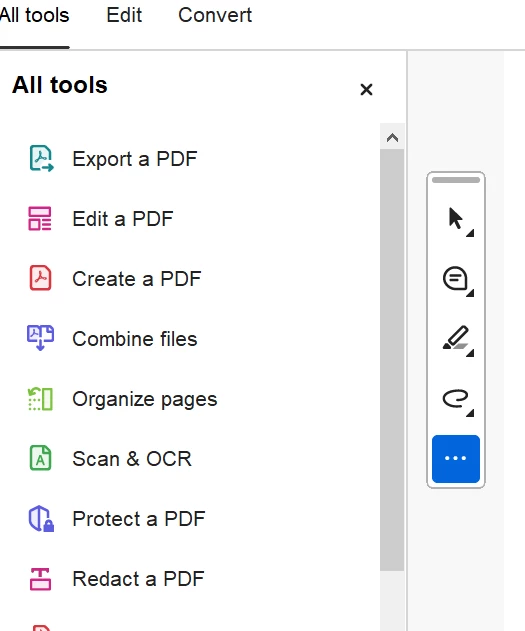
Can't find fill and sign on Acrobat on PC

  • September 11, 2024
  • 1 reply
  • 539 views

Hi I have Adobe all app, but I could not see fill and sign on the tool bar (Acrobate on PC), tried the customize tool and added it, but it still dosen't appear in the tool bar. How to resolve this issue? Thanks
This topic has been closed for replies.

1 reply

Adobe Employee
September 13, 2024

Hi @peiyan_3242 ,


Sorry for the inconvenience!

Can you please tell:

1. What is the Acrobat version?

2. Win or Mac OS?

3. What kind of subscription is on your Id? Are you able to see other Tools and only FnS is missing?

4. Can you please share registry hive incase of Win:

Press windows key+R-> Type regedit->press enter-> right click on this path and export it Computer\HKEY_CURRENT_USER\Software\Adobe\Adobe Acrobat\DC->share the reg file with us.
On Mac:

Open Finder-> type  ~/Library/Preferences/-> Share com.adobe.Acrobat.pro.plist


Can we setup a meeting to look into the issue?


Thanks

Sanchi

Participant
October 7, 2024

Hi Sanchi,

I have the Adobe Creative Cloud All Apps Edu, so I have the newest version of Acrobat. I am using Window. 


Thanks. 

Adobe Employee
October 7, 2024

Thanks Peiyan for your reply!

Can you please share the below mentioned registry hive:


Press windows key+R-> Type regedit->press enter-> right click on this path and export it Computer\HKEY_CURRENT_USER\Software\Adobe\Adobe Acrobat\DC->share the reg file with us.


Thanks

Sanchi