


strong_experience16B8
Participating Frequently
March 13, 2025
Answered

Can't get rid of "Get Started With Acrobat.pdf" tutorial in recents list

  • March 13, 2025
  • 2 replies
  • 1279 views

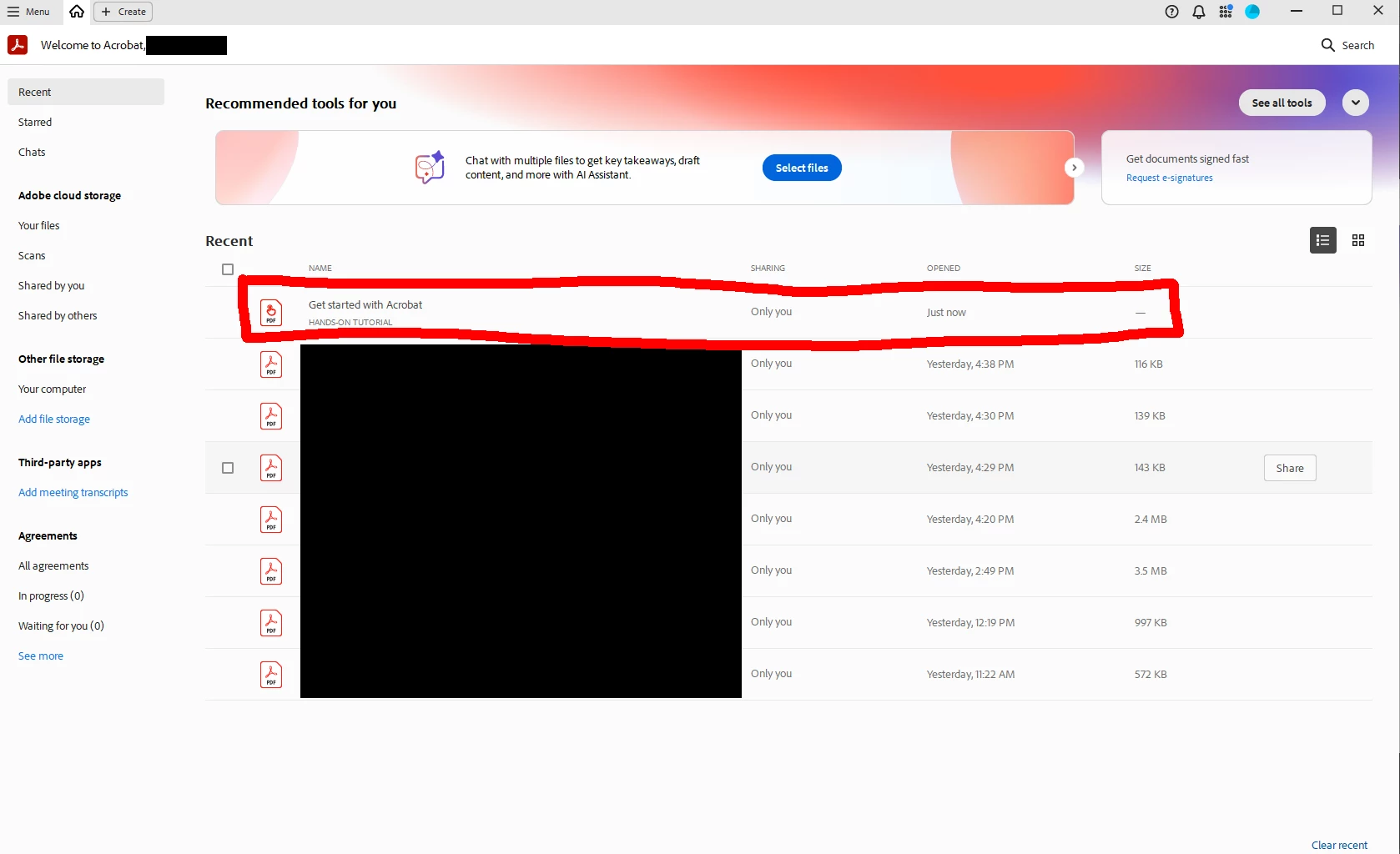
Just switched to new UI, and this item keeps appearing at the top of the recents list on launch.

I have tried completing the tutorial. I have deleted the item from the recents list. I have deleted ALL the recents list. I have turned off the recents list altogether (setting recent items to zero).

No matter what I do, every time I launch Acrobat, this item reappears at the very top of my recents list with a time stamp of "just now". Like it's being automatically opened and closed every time I launch without my seeing it.


When I switch back to classic UI, I can delete the item and it never returns. Until I switch back to new UI, then it starts all over again.


Anyone know how to get rid of this (yet again) really annoying and nagging "feature" in new UI? Screenshot below.

Thanks!
Correct answer Igor5FEB

Just delete the folder:

C:\Program Files\Adobe\Acrobat DC\Acrobat\Tutorials\Resources

and restart Acrobat.

Note, you might need to adjust the folder location accordingly if you are using Reader (not DC/Pro) or 32-bit (x86) version.

2 replies

Igor5FEBCorrect answer
Inspiring
June 13, 2025

Just delete the folder:

C:\Program Files\Adobe\Acrobat DC\Acrobat\Tutorials\Resources

and restart Acrobat.

Note, you might need to adjust the folder location accordingly if you are using Reader (not DC/Pro) or 32-bit (x86) version.

Inspiring
June 13, 2025

Also, if you haven't done it already, select that file in the list of Recent files under Acrobat's home page and click "Remove from recent" in menu on the right.

S_S
Community Manager
Community Manager
March 16, 2025

Hi @strong_experience16B8,


Hope you are doing well. Sorry for the trouble. 


What you can do here is, click the checkbox to the left of the file name and remove from recent.

Once done, go over to Menu-> Help-> Repair Installation-> Restart.


You may also try to reset the Acrobat preferences as described here https://adobe.ly/3RezCT0...


Hope this helps.


Regards,
Souvik.

strong_experience16B8
Participating Frequently
March 17, 2025

Neither of those two suggested procedures resolved the problem. The items keeps appearing at the top of the recents list on every launch.

Amal.
Community Manager
Community Manager
March 17, 2025

Hi there


Hope you are doing well and thanks for reaching out.


As described, the issue started after you switched to new Acrobat UI, could you please try to disable the new UI go to hamburger Menu > Disable new UI and reboot the computer once.

Also, make sure the application is updated to the latest version 25.01.20432, Go to Help > Check for updates and reboot the application.